Product ·
How to Review an AI-Drafted Pentest Finding Before You Sign It
Where AI-drafted pentest findings go wrong, what a reviewer checks in each section, and why the review starts with knowing which words the model wrote.
An AI-drafted finding goes wrong in specific, predictable places. None of them show in the prose: the sentence with the wrong version in it reads exactly as well as the sentences around it.
So the review leans less on how a finding reads and more on what it claims. Here is how we’d run it, section by section, and the one thing to settle before you start.
Know which sections the model wrote
Before anything else, find out where each part of the finding came from. Each source fails in its own way:
- Library text is written generic on purpose. Check that it was tailored to this target, and that nothing came across from an earlier report.
- Scanner text describes the check the tool ran. Hold it to what the tester verified, and drop any claim they didn’t confirm.
- Model text can be wrong anywhere. It gets every check below.
- The tester’s own words carry their judgement. Check the reasoning.
If nobody can tell you which is which, every sentence gets the model treatment. On a long report in a busy month, that’s the review that gets cut short.
Check every identifier against its source
Models are at their most confident with identifiers, and identifiers are where they slip. For each one in the draft:
- CVE IDs: open the advisory. Confirm it describes this issue, and that its affected range includes the version in your evidence. An ID one digit off from the right one still opens a real advisory, for a different bug.
- CWE and OWASP categories: check that the number matches the name, and that the edition is the one your report template uses. A CWE number beside the wrong title, or an OWASP category with the wrong year on it, reads fine until the client’s engineer looks it up.
- References: open every link. Check that it resolves, and that it’s the vendor’s own advisory rather than a blog post summarising it. A plausible URL on a real vendor’s domain proves nothing until it loads.
Hold every fact to the evidence
Every concrete detail in the description should trace back to something the tester captured: the host, the endpoint, the parameter, the response code, the path in the error page. Read the draft beside the evidence and tick each one off.
Watch for two things going wrong in opposite directions. Details that appear nowhere in the evidence, which the model supplied because they make the story complete. And details in the evidence that never made it into the draft, because a model handed a page of notes doesn’t always use all of them.
Impact needs its own pass. It can go beyond what the tester demonstrated, since the rules of engagement stop short on purpose, but it has to be a reasonable outcome for this system and this evidence. A model tends to write impact for the vulnerability class. “Can be used to identify additional vulnerabilities” fits any finding. “Each error page hands the failing SQL to anyone who asks, no account needed” fits this one. Keep what’s specific, mark what’s inferred, and cut what’s boilerplate.
Don’t let the wording set the rating
The tester proposes the rating and the reviewer challenges it. Neither should accept a rating the model chose, or one its wording nudged up or down. Check that the impact text, the rating and the stated likelihood agree: a severe outcome under a moderate rating is fine when the reasoning for the lower likelihood is written down, and a question when it isn’t.
Scope is the other line a draft can cross. Check that nothing in it claims or implies testing on systems outside the agreed scope.
Read the recommendation as the client’s engineer
The recommendation is the part the client acts on, so read it as the person who has to do the work. Is it written for their stack, or for the stack this kind of finding usually involves? Does it fix the cause, or only the symptom the tester demonstrated? Would it hold up at the retest?
Generic remediation is the model’s safest output and the client’s least useful one. When it’s generic, the tester knows the specifics. Send it back to them.
When a tester has already edited the draft
An edited AI section is the hardest one to review. The tester did what you’d ask: put in the client’s hostnames, softened an impact they couldn’t prove. It reads as one person’s work. It’s two: the tester’s corrections, and the model’s sentences nobody touched.
Those need different reviews. The tester’s changes are judgement, so check the reasoning. The model’s surviving sentences still need every fact check above. Telling them apart takes the draft as the model first wrote it, and a record of what the tester changed.
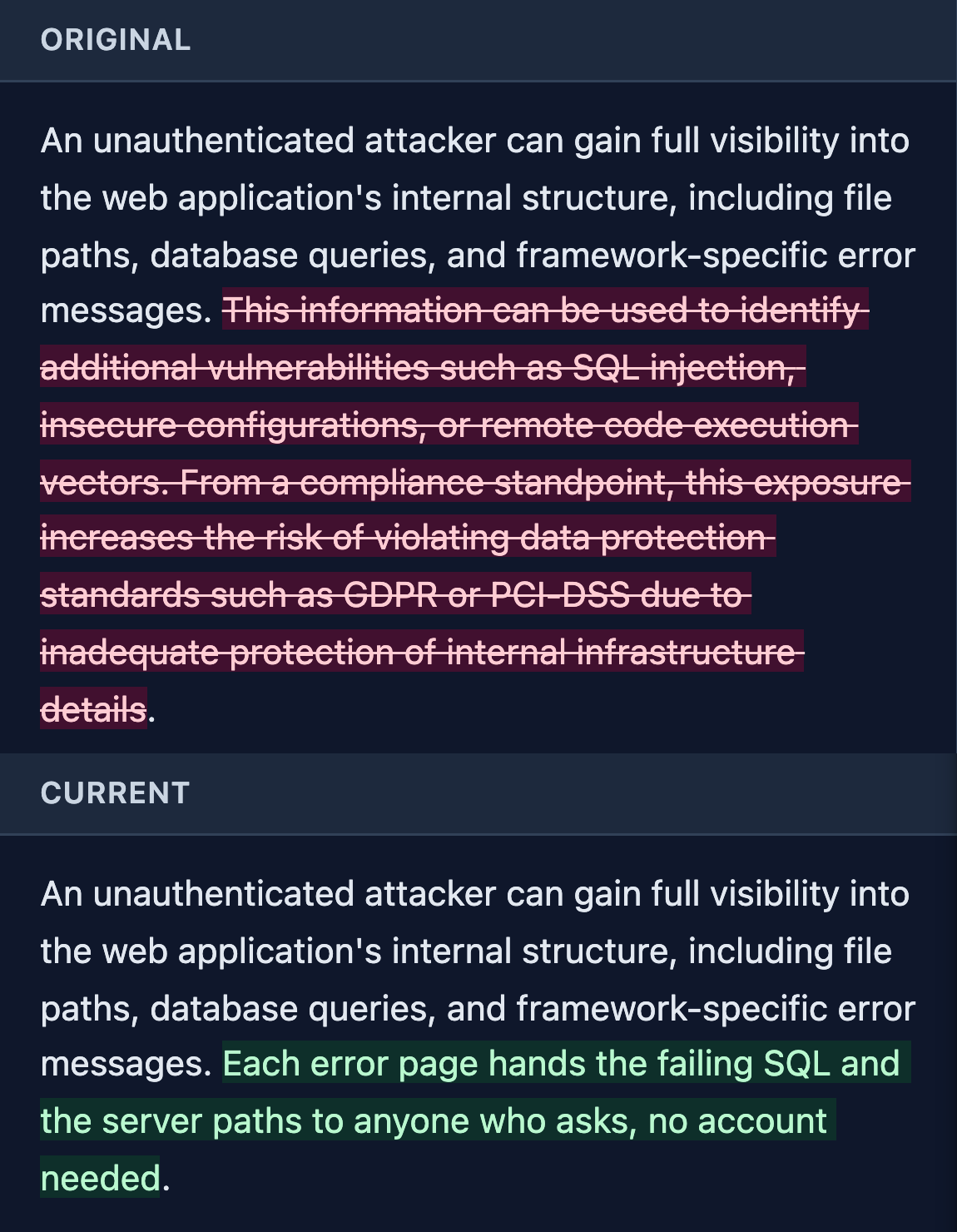
How we built Neuron for this review
The four sources from the top of this page arrive marked. A section the model drafted says Neuron AI. Library text names the entry it came from, scanner output says Scanner, and a tester’s own writing carries nothing.
Once a tester edits a model section, it says Neuron AI · edited. One click shows the model’s first draft with the tester’s changes marked, as in the capture above.
The marks stay on through every review step, and the tester who submitted a finding can’t approve it. They come off when the finding is approved.
Before a new model drafts client work, the built-in benchmark runs it against invented findings on your own servers and shows where it slips, such as notes it leaves out of the draft. You learn which of the checks above your model needs most before a client’s report teaches you.
The prose won’t tell you where to look. The finding should.
The full case for reviewers and practice leads is at reviewing AI-drafted pentest findings. To see the marks on a real finding, walk through it at neuron.ws/demo.
Thanks for reading,
The PenTest.WS Development Team
Get Neuron news in your inbox
New capabilities and how teams use them. No spam.