Product ·
How to Write Nessus Findings Your Client Hasn’t Already Read
Your client can read a Nessus plugin’s text on a public page. A finding that opens with it tells them nothing they couldn’t have found on their own.
Where your client runs Nessus, their admin can open the same plugin in their own console and read the same paragraph, word for word. Where they don’t, its public page on tenable.com is one search from the finding’s title. Either way, the paragraph your report opens with is one they can read without you.
Before your tester opens the .nessus file, every finding in it already has that wording: a description, a solution, a severity, and on a version check, a note on how the plugin decided. The scanner’s vendor wrote it once, for every network the plugin fires on. The host list is every hit, before your tester has checked one.
The description: say what it is on this network
The plugin’s description explains the class of issue to anyone, anywhere. For SMB signing it runs to two sentences: signing isn’t required, and an unauthenticated attacker could use that for man-in-the-middle attacks. Both are true of every network the plugin has ever fired on.
Write what your tester found here instead:
- Where: which systems, in the client’s own terms. “The file servers in the finance segment” tells them more than an IP range.
- What it allowed: what the tester did with it, or could have, from where. If they relayed a captured login to a file server and listed a share, say so in a sentence.
- Who it touches: the users, data or service behind it.
Keep the class explanation to a line, or point to a reference. The client can look up what SMB signing is. They can’t look up what it meant on their network.
The solution: write the fix for their estate
The plugin’s solution is generic. For an untrusted certificate, it’s a single sentence: “Purchase or generate a proper SSL certificate for this service.” Even a fuller one, like SMB signing’s, names the right setting and stops there. It can’t know which of the client’s systems the change breaks, or which ones the setting never reaches.
The admin who picks up the finding needs the version for their estate:
- Where it goes: the policy that covers their servers, and the systems it won’t reach: the printers, the storage boxes, the hosts outside the domain.
- What it breaks: old clients that can’t sign, a service that pins the current certificate. Say so, or say nothing does.
- How they’ll know: the check your tester would run at the retest, in one line.
If you don’t know their estate well enough to write that, say what you’d need to know. That’s still more useful than the plugin’s sentence.
The severity: rate it for this network
Nessus sets a plugin’s severity from its CVSS base score, and a base score leaves out everything about the environment by design. Your rating is where the environment comes back in.
Two findings that Nessus rates Medium show why that matters:
- SMB signing not required can be the step that lets an attacker relay their way to the domain. Where your tester showed that path, it’s rated for what they showed.
- An untrusted certificate on an internal wiki that only staff reach might sit lower than the scanner put it.
Whichever way it moves, put the reason beside the rating in one sentence. A critical or high starts a remediation deadline on the client’s side, and the person who signs off that plan will ask why.
The hosts: list what your tester confirmed
The scanner’s host list is every system the plugin fired on. On a version check, that includes the builds it can’t tell are patched: the appliance or vendor build that took the fix without a new version number.
List the hosts your tester confirmed as affected. Where they ruled one out, say which host and why in a line (“vendor build includes the fix; checked against the vendor’s advisory”). The admin who would have re-tested it gets the answer instead, and the one host that doesn’t belong never makes them doubt the rest.
The version note: replace it with what your tester did
A plugin that checks a version string says so in its description. For Apache’s 2.4.60 fixes, it reads: “Note that Nessus has not tested for these issues but has instead relied only on the application’s self-reported version number.”
That’s an honest sentence from the scanner. In your report, it says something about your test that may not be true. If your tester confirmed the issue, the note sits above evidence that contradicts it. Replace it with how they confirmed it.
If they didn’t confirm it, say that in your own words and say why: “Identified from the version banner. Not exploited: the rules of engagement didn’t allow exploitation on production systems.” The client gets the same caveat, from the people who made the call.
Why it slips anyway
None of this is news to a senior tester. Scanner lows get grouped, or go to an appendix, as the team’s reporting standard decides. The ones that stand as findings are written last, as delivery closes in, and they’re where plugin wording survives into the report.
Your team has written most of those findings before. The better version sits in a shared document, the plugin text sits in the finding, and getting one into the other is copy, paste and edit, finding by finding. That’s the job that loses to the deadline.
How we built Neuron for it
In Neuron, the SMB signing write-up your team did last year is waiting when this year’s scan raises the plugin: your description, your fix, your rating, on only the hosts your tester confirmed.
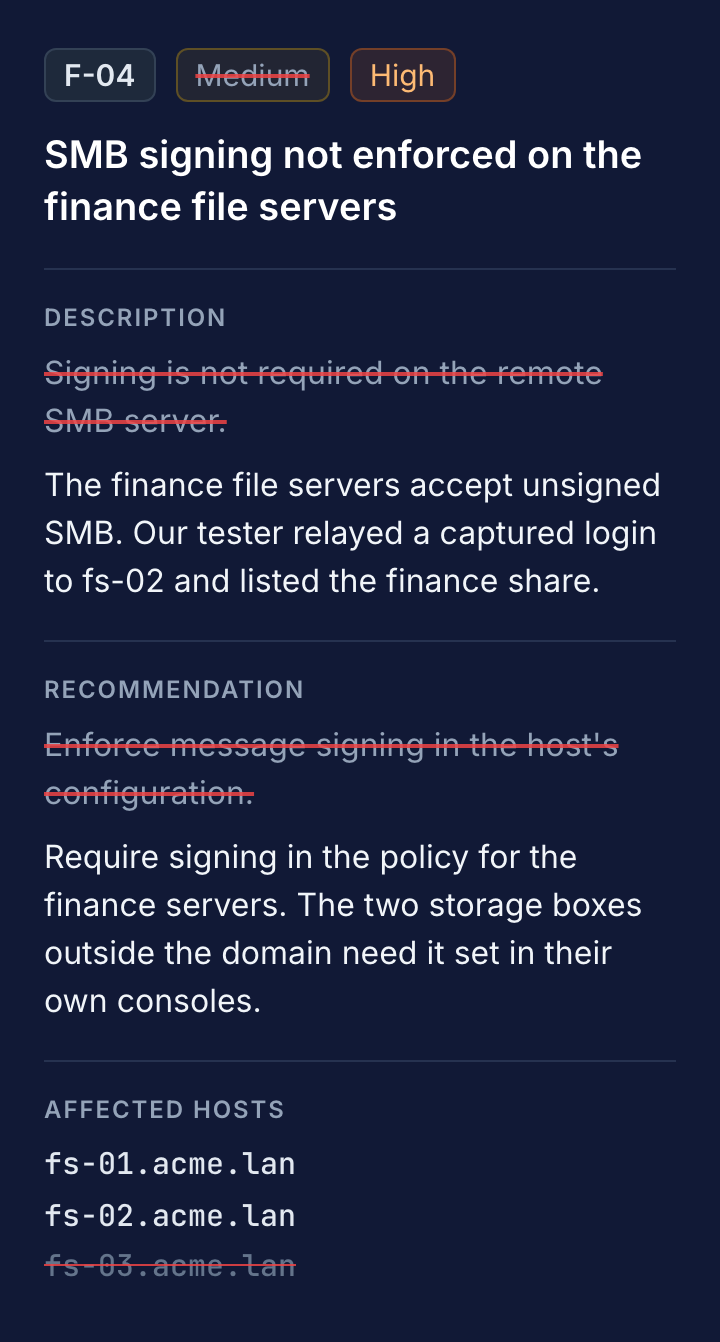
Each write-up you add covers that plugin on every test after, so the checks your reports raise most are the first to come in your words.
The plugin text is still one search away for anyone who wants it. Your finding no longer starts with it.
The full case, from the client’s side of the report, is at scanner findings in your team’s words. To see a scan go in and confirmed findings come out, walk through it at neuron.ws/demo.
Thanks for reading,
The PenTest.WS Development Team
Get Neuron news in your inbox
New capabilities and how teams use them. No spam.