Product ·
Print Memo: Findings Before the Report
Print Memo turns selected findings into a document of their own, so a critical issue reaches the client the day it's found, not the day the report ships.
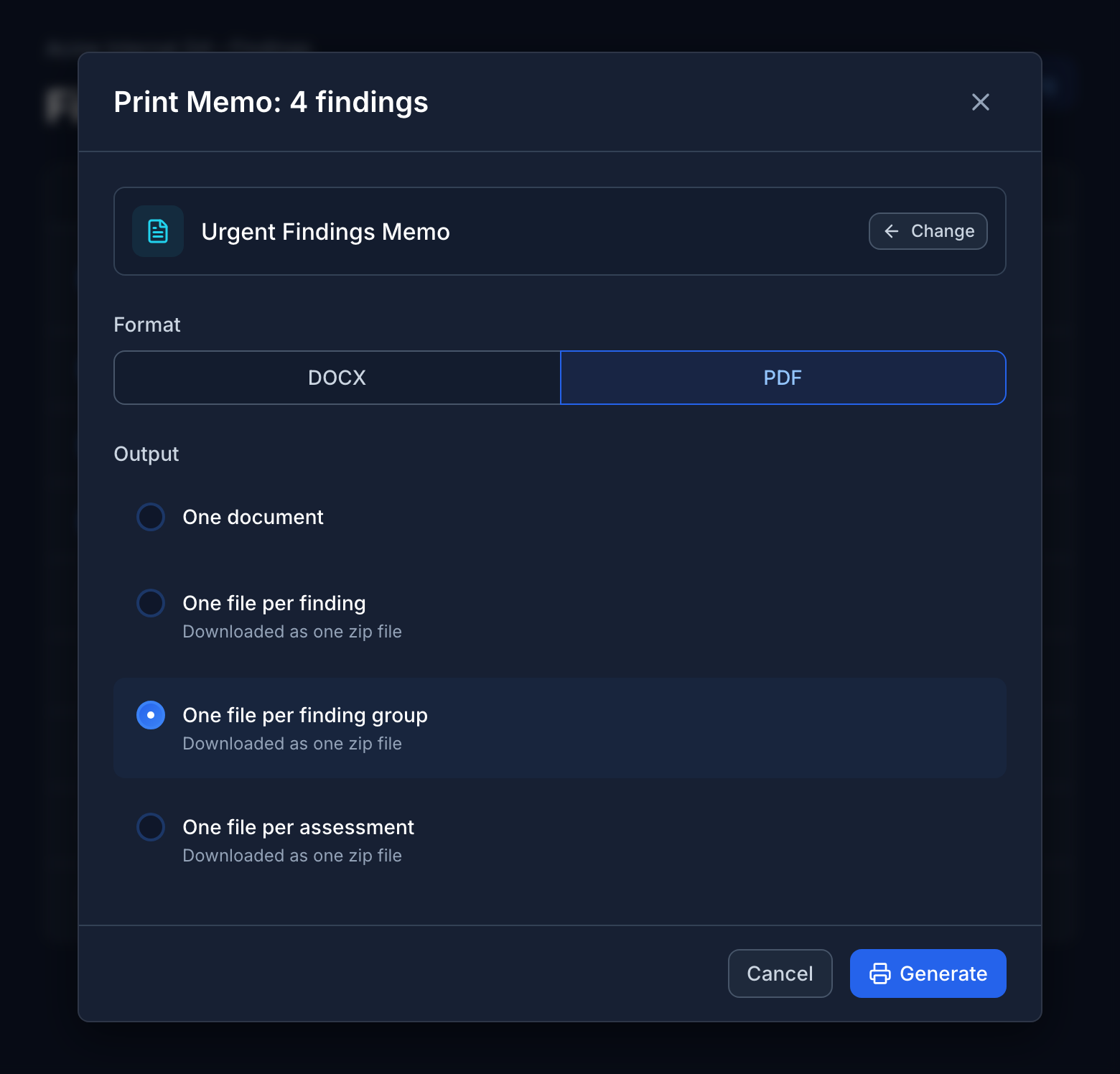
You find a critical on day two of a three-week engagement. The client needs to know today, not when the final report is signed off.
Until now that meant opening Word, pasting the finding in, rebuilding the formatting by hand and hoping the memo matches what ends up in the report. A second copy of the finding, written under pressure, that nobody reviews.
Print Memo produces that document straight from the finding.
A Document for the Findings You Choose
Open a finding and choose Print Memo from its menu. For several at once, tick them on the Findings page, or tick a group’s header to take the whole group, and choose Print Memo from the bulk actions.
Pick a memo template and a format, DOCX or PDF, and the memo downloads as soon as it’s ready. It’s listed on the Reports page alongside every other report for the engagement, so there’s a record of exactly what was sent and when.
Split It the Way Your Client Is Organized
The infrastructure team doesn’t need the application team’s findings, and the reverse is just as true. With several findings selected, choose how the output is split:
- One document covering every selected finding
- One file per finding
- One file per finding group
- One file per assessment
Split output arrives as a single zip, one file for each audience.
Findings Only Templates
Memos use a new Findings Only report template type. It contains the selected findings and the engagement and client details, and nothing else: no briefs, no statistics, no other findings. It’s a Word template like your full report, so the memo can carry the same branding and finding layout your client will see in the final report.
Because a Findings Only template is never given engagement-wide data, it can’t leak details of findings that weren’t selected. Neuron refuses the template at upload if it asks for anything more.
The Reports list now shows a Type for each report, Full Report or Findings Only, and what it Covers: all findings, a single finding number, or how many findings a memo included.
QA Still Applies
Speed shouldn’t mean skipping review. If a selected finding hasn’t been approved through QA, the dialog says so and lets you leave it out. Roles without the Can Export Draft Reports permission can’t print unapproved findings at all.
Any report built over findings or briefs that weren’t approved carries a Generated before QA approval notice on its page, and again when it’s published as a deliverable.
Regenerate When Things Change
Reports now generate on the server, so you can leave the page while one runs and come back to the finished file. If a finding is updated after the memo goes out, Regenerate rebuilds the report with the same template, format and settings. A memo rebuilds from the same findings it was created with.
What This Means for Your Team
Urgent findings reach the client while they’re still urgent, written from the same reviewed content that will appear in the final report. No second copy, no hand formatting, and no wondering later what was sent.
If you’d like to see Print Memo in action, visit neuron.ws/demo
Thanks for reading,
The PenTest.WS Development Team
Get Neuron news in your inbox
New capabilities and how teams use them. No spam.