Product ·
Redact Evidence Without Leaving Neuron
Neuron's built-in image editor suggests redactions for the secrets in a screenshot, purges the unredacted original, and keeps every screenshot in a report looking the same.
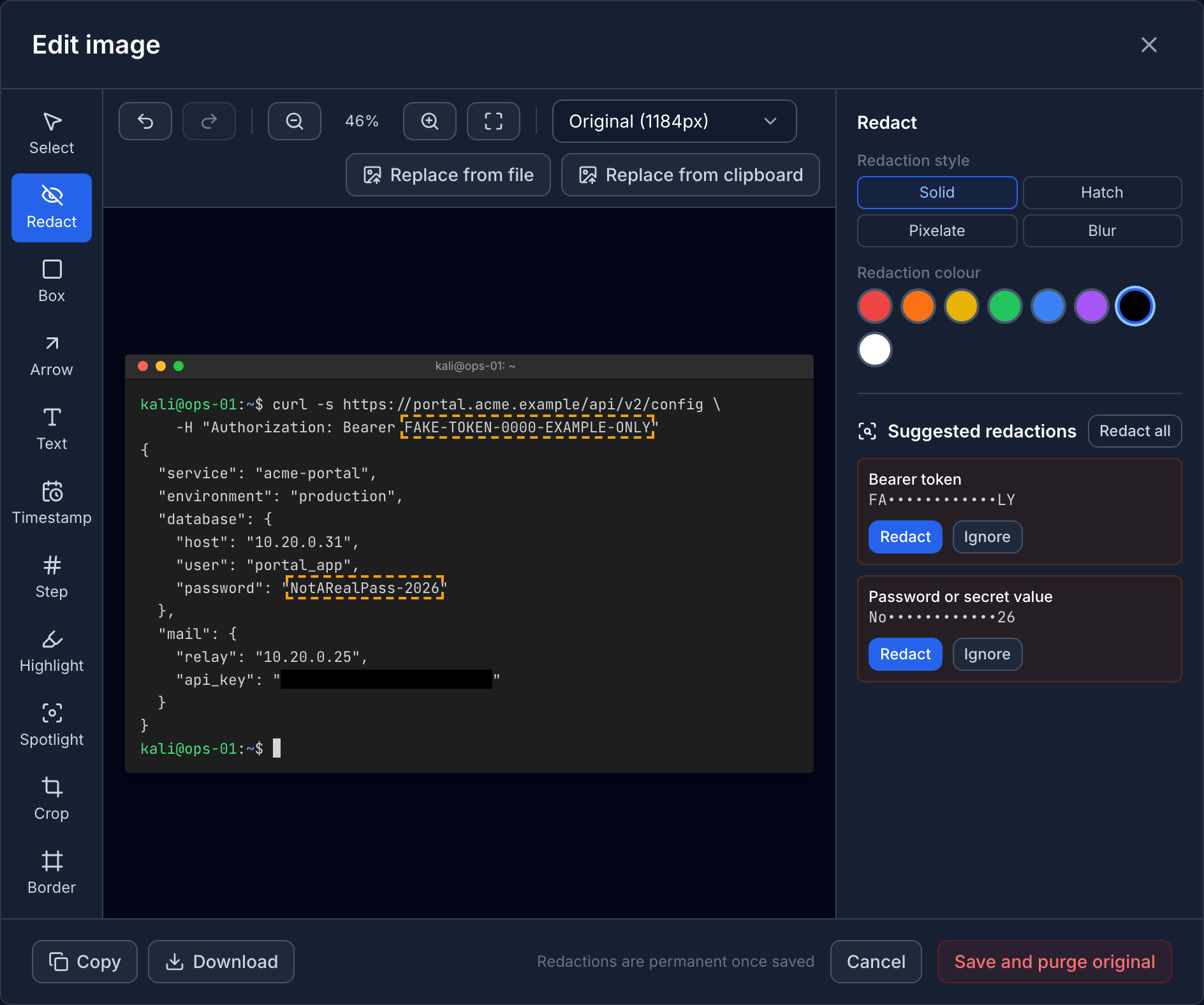
Every tester has a screenshot folder full of cleartext passwords, session tokens and NTLM hashes. Before any of it goes in a report, someone has to open each image in another tool, black out the secrets, save a copy, and paste it back in.
Then the original is still sitting in the finding’s history, the library entry it came from, and every other place it was pasted.
Neuron now has an image editor built in, and it treats redaction as something that has to be permanent.
Edit Where the Evidence Lives
Hover over any screenshot pasted into Neuron’s editor and choose Edit image. There’s no export, no external editor and no re-upload.
- Redact with Solid or Hatch to hide an area completely. Pixelate and Blur are there for faces and desktop clutter, and the editor warns you never to use them on passwords, keys or tokens, because text treated that way can sometimes be recovered.
- Annotate with Box, Arrow, Text, Highlight, Step markers for numbered walkthroughs, and Spotlight to dim everything outside the part that matters.
- Crop to the area that proves the point, and shrink oversized screenshots on save.
- Undo and Redo step through every change since the editor opened.
Annotations stay editable. Open the image again next week and every arrow and label is still there to move or change.
Neuron Spots the Secrets for You
When the editor opens, it reads the text in the image and lists anything that looks like a secret under Suggested redactions: passwords, bearer tokens, cloud keys, JWTs and password hashes. Click Redact on one, or Redact all, and the box is drawn for you.
The suggestions come from Redaction Patterns in the library. Neuron ships built-in patterns for common secrets, updated with each release, and admins can add their own for anything specific to a client or tool. A pattern can hide just the value and leave its label readable, so x-api-key: stays visible while the key itself is covered.
Redaction That Actually Removes the Original
A box drawn over a secret is only useful if the secret underneath is gone. When you save a redaction, Neuron draws it into the image and purges the original, overwriting it with the redacted version.
The purge reaches every document, revision and library entry in the engagement that shows the image, including identical copies and annotated versions. It never touches another engagement. Before you confirm, Neuron lists what it can’t reach, such as reports already generated or deliverables already published, so you know what to regenerate. Every purge is recorded in the admin audit log.
Screenshots That Match
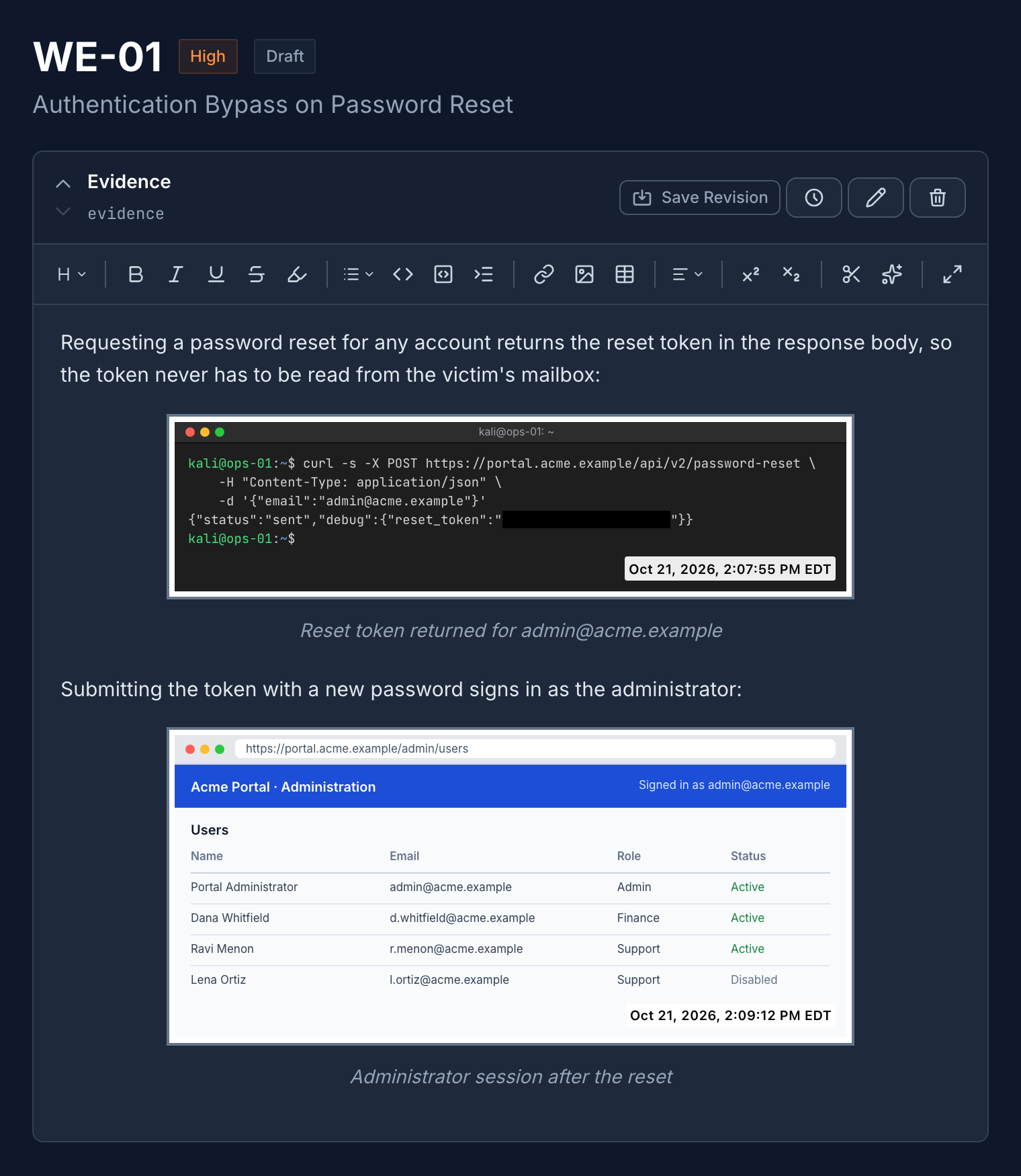
Reports look sloppier than they are when every screenshot has a different frame. The Border tool sets the placement, colour, width and padding, and keeps the same thickness on every image, large or small, in the editor and in generated reports.
The Timestamp tool stamps when a screenshot was captured, starting from the time the image was uploaded, in the time zone and format your engagement uses.
Both are shared across the engagement. Save one image with a border and a timestamp style, and that becomes everyone’s starting point for the next one.
What This Means for Your Team
Secrets come out of evidence before it reaches a reviewer, a report or a client, and they don’t linger in an old revision. Testers stop switching tools to fix screenshots, and every image in the report looks like it came from the same team.
If you’d like to see the image editor in action, visit neuron.ws/demo
Thanks for reading,
The PenTest.WS Development Team
Get Neuron news in your inbox
New capabilities and how teams use them. No spam.