ffuf Reporting,
Every Hit Where It Belongs
Run ffuf through the Neuron CLI and every hit lands in your engagement against the web app it belongs to. Content discovery reporting without copying terminal output.
Just Test. The Timeline Writes Itself.
ffuf finds the backup file, the admin panel, and the forgotten API version. Then the results scroll off the screen and live in a JSON file nobody opens again. Neuron files each one against the app it came from.
Put neuron in front of ffuf and every hit lands in the engagement against its web app, with status code, size, words, and the payload that found it, and the command lands on the timeline.
Feed it the engagement's in-scope web apps with neuron export, and one run covers the whole scope.
$ neuron export web-apps apps.txt✓ 12 in-scope web apps written $ neuron ffuf -w apps.txt:URL -w raft-medium-words.txt \ -u URL/FUZZ -mc 200,301,403 .git/HEAD [Status: 200, Size: 23, Words: 2]✓ 27 paths imported- 13:12 Finding Exposed .git directory
- 13:05 Import ffuf: 27 paths on 4 web apps
- 12:51 Command ffuf -w apps.txt:URL -u URL/FUZZ
- 12:48 Import Nuclei: 18 results, 12 web apps
Why ffuf Reporting Takes So Long
Content discovery is noisy by design. One run against one app can return hundreds of hits, and the three that matter, a .git directory, a database backup, an unauthenticated admin route, are easy to lose in the scroll.
Across a whole web application assessment, that means dozens of runs, each with its own filters, each saved to a file on whichever box ran it. When the finding gets written, nobody remembers which run found the backup or what the response looked like.
And the wordlists and filters that actually worked never make it back to the team.
Everything ffuf Produces, On the Engagement
Put neuron in front of ffuf and the results import the moment it finishes.
Discovered Paths
Every hit as content on its web app in the engagement, so findings attach to the right application.
Response Details
Status code, size, words, lines, content type, and redirect location for each hit, ready to triage.
The Payload
The wordlist entry that produced each hit, so the result can be reproduced exactly.
Run Settings
The wordlist, matchers, and filters you ran with, recorded with the command so the next tester can run it again.
Who Found It
Each hit is attributed to the tester and the run that produced it, so whoever writes the finding knows exactly who to ask about the response.
How to Log ffuf to Your Engagement
- 01
Pull the team wordlists
Keep the team's wordlists in the engagement File Share and copy them to whichever box runs the scan, so everyone fuzzes with the same lists.
$ neuron --ssh jumpbox copy 'neuron:wordlists/*' ~/wordlists/ - 02
Write the app list
Export the engagement's in-scope web apps to use as ffuf's URL wordlist. One file, every app the client approved, nothing they did not.
$ neuron export web-apps apps.txt - 03
Fuzz every app in one run
Put neuron in front of ffuf and use keyword wordlists so one run covers the whole scope. Add -ac to auto-calibrate away each app's soft 404s.
$ neuron ffuf -w apps.txt:URL -w words.txt -u URL/FUZZ -mc 200,301,403 -ac - 04
Send the winners back
Built a custom list that found something on this client? Copy it back to the File Share and the next web test starts with what worked here.
$ neuron copy ./acme-words.txt neuron:wordlists/
Your Infrastructure. Your Data.
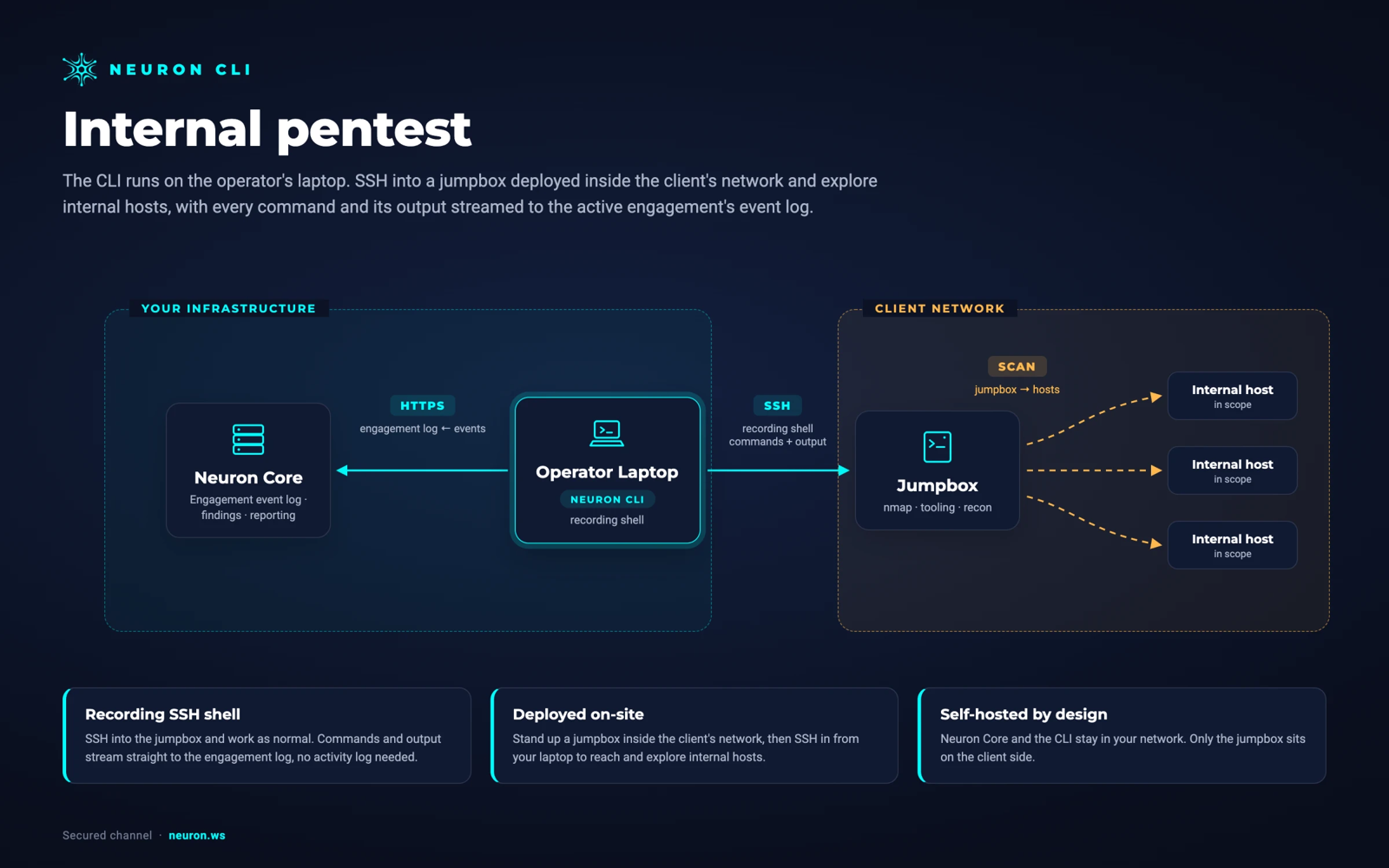
Run ffuf from a jumpbox inside the client's network over SSH. Nothing is installed on the jumpbox. Neuron and the CLI stay in your network, and the results never pass through a third-party cloud.
From ffufto the Final Report
Every hit is already attached to the web app it was found on. Promote the exposed backup or the unauthenticated admin route into a finding, with the URL and response details already in place.
Because the run settings are on the timeline, the finding can say exactly how the content was discovered, and the retest can run the same command to prove it is gone.
Paths that came back 403 are leads, not findings. They stay on the web app for the manual testing that follows, so the tester who picks up the admin route next week starts from the exact URL.
ffuf Integration FAQ
The questions teams ask most about ffuf and Neuron.
How do I get ffuf results into a pentest report?
Run ffuf through the Neuron CLI by putting neuron in front of it. Every hit imports against its web app with status code, size, and the payload that found it, ready to promote into a finding.
Can I fuzz every in-scope web app in one run?
Yes. Export the engagement's web apps with neuron export web-apps, then pass that file to ffuf as a keyword wordlist. Hits import against the app they belong to.
Does ffuf auto-calibration still work through neuron?
Yes. -ac and every other ffuf flag pass through unchanged. Only the hits ffuf keeps after its own filtering are imported, so calibrated noise never reaches the engagement.
Are 403 and redirect responses imported?
Whatever your matchers keep. With -mc 200,301,403 the forbidden paths and redirects import too, with their redirect location, which is often where the admin panel is hiding.
Can I run ffuf from a jumpbox?
Yes. Add --ssh and the host and ffuf runs there, reaching internal apps your laptop cannot. The hits import as if it had run locally, over your own ssh.
More Neuron Integrations
Burp Suite Reporting and Findings Import
Web TestingZAP Reporting and OWASP ZAP Alert Import
Web TestingCaido Reporting and HTTP History Import
Web TestingOpenAPI and Swagger Import for API Pentests
Web TestingNuclei Scan Reporting and Import
Web TestingNikto Reporting and Output Import
Web TestingAcunetix Report Import for Pentest Reports
Web TestingInvicti and Netsparker Report Import
Web TestingReady to Transform Your Security Practice?
See how Neuron helps security teams replace fragmented tools with a single platform for offensive security, bringing structure, visibility, and consistency to every engagement.
Platform