Nuclei Reporting,
Without a Conversion Script
Run Nuclei through the Neuron CLI and every result lands in your engagement as a scan issue, ready to promote into a finding. Nuclei reporting without a conversion script.
Just Test. The Timeline Writes Itself.
Nuclei produces results fast. Getting them into a report usually means a conversion script, a spreadsheet, or both. The Neuron CLI imports them the moment the scan finishes.
Put neuron in front of nuclei and every match lands in the engagement as a scan issue, with the template, severity, matched URL, and extracted values, and the command lands on the timeline. Hosts and web apps are created from the targets as they import.
Already have the JSONL from an earlier run? neuron import picks the right importer from the content.
$ neuron export web-apps apps.txt✓ 12 in-scope web apps written $ neuron nuclei -l apps.txt -jsonl [CVE-2023-46604] [critical] https://mq.acme.example [exposed-panels] [info] https://app.acme.example/admin✓ 18 results imported- 11:35 Finding Apache ActiveMQ RCE (CVE-2023-46604)
- 11:31 Import Nuclei: 18 results, 12 web apps
- 11:24 Command nuclei -l apps.txt -jsonl
- 11:20 Command neuron export web-apps apps.txt
Why Nuclei Reporting Takes So Long
Nuclei is fast because it runs thousands of templates. That is also why its output is hard to report on: hundreds of matches across dozens of targets, most of them informational, a handful of them critical.
Teams end up writing their own scripts to turn JSONL into something reviewable, then triaging in a spreadsheet, then copying the real issues into the report one at a time. Every scan, every engagement.
And the matched request that proves the issue lives in a file nobody attaches.
Everything Nuclei Produces, On the Engagement
Put neuron in front of Nuclei and the results import the moment it finishes.
Scan Issues
Every match as a scan issue in the engagement, with the template ID, name, and severity, ready to triage.
Proof
The matched URL, matcher, extracted values, and the request that reproduces it, attached to the issue as evidence.
Hosts and Web Apps
Hosts and web apps created from the targets as results import, so every issue is tied to the asset it was found on.
Tags
Tag everything an import creates with --tag, so a scan of one environment never gets confused with another.
The Scan You Ran
The template set, severity filter, and rate limit you used sit on the timeline with the command, so the report can state exactly what the automated checks covered.
How to Log Nuclei to Your Engagement
- 01
Update the templates
Pull the latest templates before the scan. The update runs through neuron too, so the template version you tested with is on the record.
$ neuron nuclei -update-templates - 02
Export your targets
Write the engagement's in-scope web apps to a file. The list comes from the engagement itself, so the scan never drifts onto a host the client did not approve.
$ neuron export web-apps apps.txt - 03
Run nuclei through neuron
Put neuron in front of nuclei. Everything after the tool name is passed through unchanged, and results import when the scan finishes. Add --ssh to scan from another box.
$ neuron nuclei -l apps.txt -jsonl - 04
Or import an existing file
Point neuron import at JSONL from an earlier run, or pipe it straight in. The right importer is picked from the content.
$ neuron import results.jsonl
Your Infrastructure. Your Data.
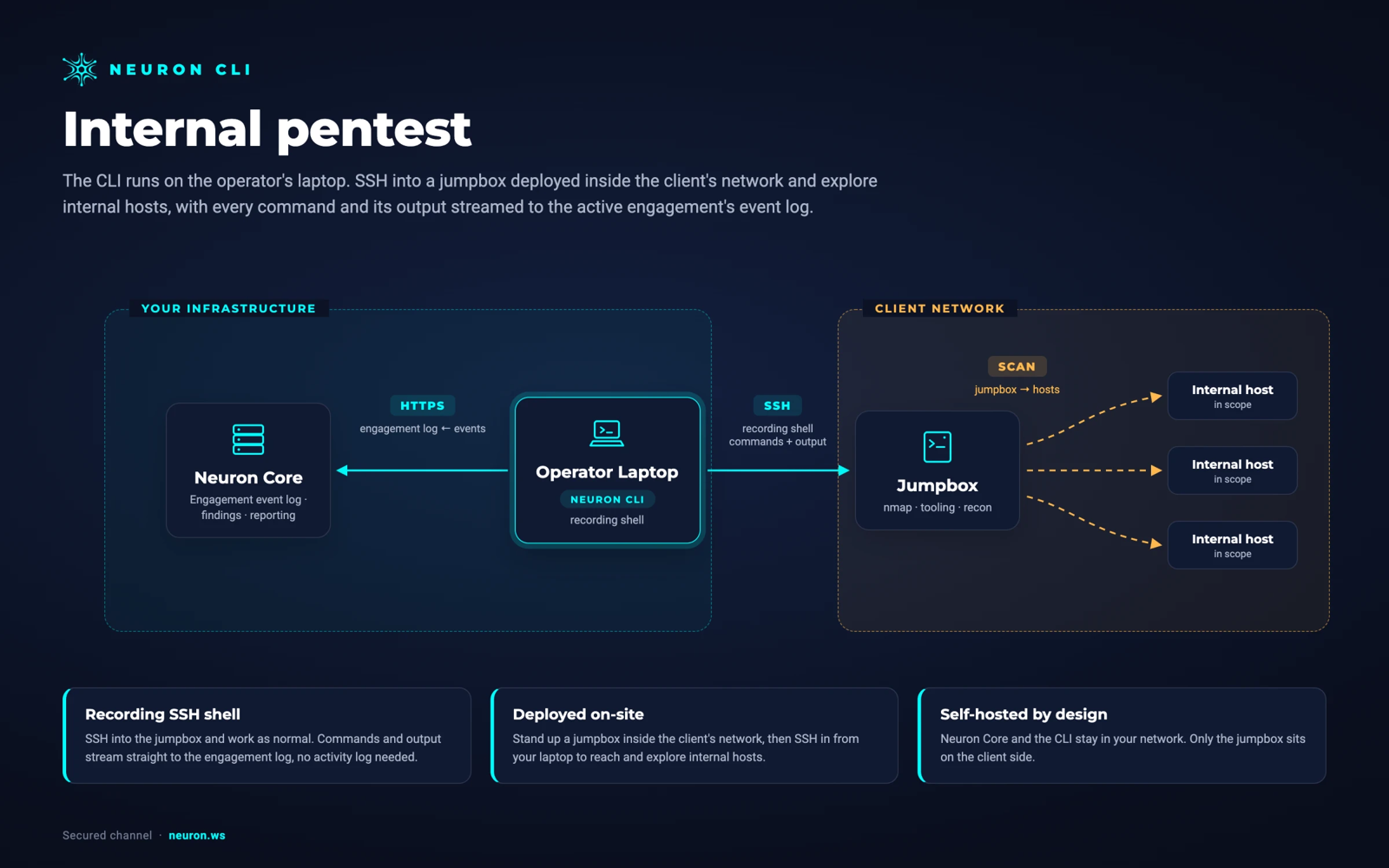
Run Nuclei from a jumpbox inside the client's network over SSH. Nothing is installed on the jumpbox. Neuron and the CLI stay in your network, and the results never pass through a third-party cloud.
From Nucleito the Final Report
Triage happens in Neuron, not a spreadsheet. Dismiss the noise, then promote the real issues into findings with the matched request already attached as proof.
Your Findings Library supplies the approved description and remediation for common issues, so a finding from a Nuclei match reads like the rest of the report.
Rescan during the retest round and the new results land in their own record, so the client sees exactly what was fixed.
Nuclei Integration FAQ
The questions teams ask most about Nuclei and Neuron.
How do I import Nuclei results into a pentest report?
Run nuclei through the Neuron CLI by putting neuron in front of it, or run neuron import on an existing JSONL file. Every match becomes a scan issue in the engagement with the template, severity, and proof attached, ready to promote into a finding.
Which Nuclei output format does Neuron import?
JSONL, the format Nuclei writes with -jsonl. The CLI detects it from the content, so you do not need to name the importer.
Can I import a scan I already ran?
Yes. neuron import results.jsonl imports any existing file, and you can pipe output straight in with neuron import -.
Can I import only high and critical Nuclei results?
Filter at the source with Nuclei's own -severity high,critical and only those matches are written and imported. Or import everything and group the Scan Issues queue by Severity, so the informational matches stay available without getting in the way.
What other scanners does the Neuron CLI import?
23 formats in total, including Nmap, Masscan, Nessus, Qualys, OpenVAS, Nexpose, Nikto, Acunetix, Invicti, Burp Suite, ZAP, Caido, OpenAPI, Shodan, Censys, PCAP, BloodHound JSON, Prowler, ScoutSuite, and MobSF.
More Neuron Integrations
Burp Suite Reporting and Findings Import
Web TestingZAP Reporting and OWASP ZAP Alert Import
Web TestingCaido Reporting and HTTP History Import
Web TestingOpenAPI and Swagger Import for API Pentests
Web Testingffuf Reporting and Content Discovery Logging
Web TestingNikto Reporting and Output Import
Web TestingAcunetix Report Import for Pentest Reports
Web TestingInvicti and Netsparker Report Import
Web TestingReady to Transform Your Security Practice?
See how Neuron helps security teams replace fragmented tools with a single platform for offensive security, bringing structure, visibility, and consistency to every engagement.
Platform