Certipy AD CS Reporting,
From the Scan You Ran
Run Certipy through the Neuron CLI and certificate authorities, vulnerable templates, and ESC conditions land in your engagement ready to become findings. AD CS reporting from the scan you already ran.
Just Test. The Timeline Writes Itself.
Certipy finds the certificate template that hands you domain admin. Writing it up means reading through its output and rebuilding the ESC details by hand. Neuron keeps every one of those details exactly as Certipy found them.
Put neuron in front of certipy and the results import the moment it finishes. Certificate authorities, vulnerable templates, the ESC conditions they meet, and the enrollment rights that make them exploitable land in the engagement, and the command and its full output land on the timeline.
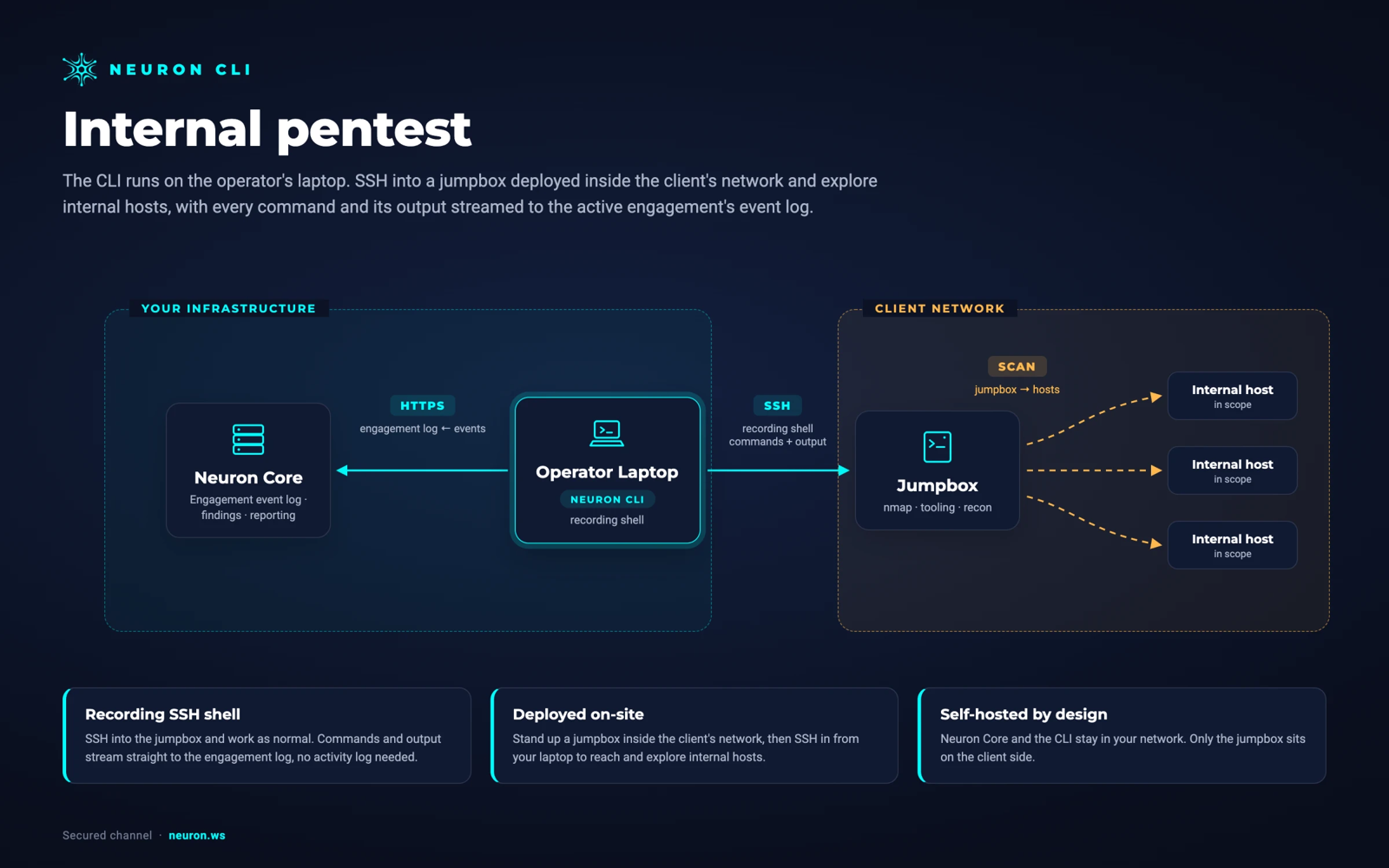
Add --ssh jumpbox to run it on the box inside the client network.
$ neuron --ssh jumpbox certipy find \ -u [email protected] -p *** \ -dc-ip 10.20.0.14 -vulnerable [*] Found 2 certificate authorities [*] Found 41 certificate templates✓ 2 CAs, 3 vulnerable templates imported- 16:21 Finding ESC1: AcmeUser template
- 16:14 Import Certipy: 2 CAs, 3 vulnerable templates
- 16:14 Command certipy find -vulnerable
- 15:40 Import NetExec: 41 hosts, 23 shares
Why Certipy Reporting Takes So Long
AD CS findings are some of the most severe in an internal test and some of the hardest to explain. A template is only vulnerable because of a specific combination of flags, EKUs, and enrollment rights, and the client needs all of it to fix the right thing.
Certipy reports exactly that combination, in a text or JSON file on the box you ran it from. Getting it into a report means copying template names, ESC numbers, and principal lists by hand, and getting one wrong sends the client to fix the wrong template.
Then the retest comes, and the whole thing is done again from scratch.
Everything Certipy Produces, On the Engagement
Put neuron in front of Certipy and the results import the moment it finishes.
Certificate Authorities
Every CA Certipy enumerated, with its configuration and the flags that matter for abuse.
Vulnerable Templates
Each vulnerable template, flagged by the ESC condition it meets, ready to promote into a finding.
Enrollment Rights
The principals that can enroll in or modify each template, so the finding names exactly who can abuse it.
Directory Data
The BloodHound-compatible data Certipy writes imports into the engagement's directory dataset for attack path analysis.
Exploitation Proof
The certipy req and certipy auth you ran afterwards sit on the timeline right after the scan, so the finding carries the certificate request and the hash it returned.
How to Log Certipy to Your Engagement
- 01
Find the vulnerable templates
Put neuron in front of certipy find. CAs and vulnerable templates import when it finishes, flagged by ESC condition, with the enrollment rights that make them exploitable.
$ neuron --ssh jumpbox certipy find -u [email protected] -p *** -vulnerable - 02
Request the certificate
Prove the ESC1 path by requesting a certificate for a privileged user. The request and its output land on the timeline as evidence.
$ neuron --ssh jumpbox certipy req -u [email protected] -p *** -ca ACME-CA -template AcmeUser -upn [email protected] - 03
Authenticate with it
Use the certificate to authenticate as that user. The NT hash Certipy returns is the proof the client cannot argue with.
$ neuron --ssh jumpbox certipy auth -pfx administrator.pfx -dc-ip 10.20.0.14 - 04
Promote to findings
Turn each ESC condition into a finding with the template, the CA, and the principals already attached, and the language pulled from your Findings Library.
Your Infrastructure. Your Data.
Run Certipy from a jumpbox inside the client's network over SSH. Nothing is installed on the jumpbox. Neuron and the CLI stay in your network, and the results never pass through a third-party cloud.
From Certipyto the Final Report
Every AD CS finding starts with the exact template, CA, ESC condition, and principals Certipy reported, so the client fixes the right thing the first time.
The abuse that followed, requesting the certificate and authenticating as a privileged user, sits on the same timeline as the scan that found it, so the finding shows proof, not just a misconfiguration.
When the retest comes, run the same command in the retest round and the result lands in its own record, next to the original.
Certipy Integration FAQ
The questions teams ask most about Certipy and Neuron.
How do I report AD CS vulnerabilities found with Certipy?
Run certipy through the Neuron CLI by putting neuron in front of it. Certificate authorities, vulnerable templates, ESC conditions, and enrollment rights import into the engagement, ready to promote into findings with the exact template and principals attached.
Which ESC conditions does the import cover?
Whatever Certipy reports. Each vulnerable template and CA is imported with the ESC conditions Certipy flagged against it.
Does the BloodHound data from Certipy import too?
Yes. Neuron imports BloodHound-compatible directory data into the engagement's own dataset, so certificate abuse paths sit alongside the rest of the attack graph. Directory datasets need the Directory module.
Is the certipy req and auth exploitation recorded too?
Yes. certipy find imports the templates, and every certipy req and certipy auth you run through neuron or inside the recording shell is logged on the timeline with its output, so the AD CS finding carries both the misconfiguration and the proof.
How does this help with retests?
Run the same command during the retest round and the result lands in its own record under the same engagement, so the client sees exactly which templates were fixed.
More Neuron Integrations
NetExec (nxc) Reporting and Logging
Active DirectoryBloodHound Reporting and Attack Path Import
Active DirectoryNmap Reporting: Nmap XML to Pentest Report
Network DiscoveryMasscan Reporting and Masscan XML Import
Network DiscoveryNuclei Scan Reporting and Import
Web Testingffuf Reporting and Content Discovery Logging
Web TestingMythic C2 Reporting and Activity Logging
C2 FrameworksSliver C2 Reporting and Activity Logging
C2 FrameworksReady to Transform Your Security Practice?
See how Neuron helps security teams replace fragmented tools with a single platform for offensive security, bringing structure, visibility, and consistency to every engagement.
Platform