Nmap Reporting,
From Scan to Finding
Run Nmap through the Neuron CLI or import Nmap XML, and hosts, services, OS matches, and NSE results land in your engagement. Nmap reporting with no copy and paste.
Just Test. The Timeline Writes Itself.
Nmap is where almost every network test starts, and its XML is where most of the detail gets stranded. Hosts, versions, OS guesses, and NSE output sit in a file on the jumpbox while someone retypes IP addresses into the report. Neuron imports that XML instead.
Put neuron in front of nmap and the CLI adds -oX for you, runs the scan, and imports the result the moment it finishes. Hosts, ports, service product and version, MAC address, OS match, and script output land on the engagement, and the command lands on the timeline.
Prefer your own flags? Run nmap -oX in the recording shell and it offers to import the file when the scan ends, or point neuron import at any Nmap XML you already have.
$ neuron export subnets subnets.txt✓ 4 in-scope subnets written $ neuron --ssh jumpbox nmap -sV -sC \ -iL subnets.txt -oA acme-internal Nmap done: 1024 IP addresses (212 hosts up)✓ 212 hosts, 1,184 ports, 9 scan issues imported- 10:48 Finding SMB signing not required (37 hosts)
- 10:41 Import Nmap: 212 hosts, 1,184 ports
- 10:26 Command nmap -sV -sC -iL subnets.txt
- 10:24 Command neuron export subnets subnets.txt
Why Nmap Reporting Takes So Long
An internal test can produce Nmap XML for a /16 across a dozen files, scanned by three testers from two jumpboxes. Merging that into one inventory usually means a parser script, a spreadsheet, and a lot of trust that nobody scanned the same subnet twice with different flags.
The NSE output is the worst part. SMB signing not required, SSLv3 still offered, anonymous FTP, a host reporting VULNERABLE to MS17-010: it is all in the XML, buried in script blocks under each port, and it only reaches the report if someone reads every one of them.
Then the retest arrives, the scan runs again, and working out what changed between the two XML files is done by eye.
Everything Nmap Produces, On the Engagement
Put neuron in front of Nmap and the results import the moment it finishes.
Hosts and Hostnames
Every live host with its IP, PTR and user-supplied hostnames, MAC address, and top OS match from -O, created by IP, by hostname, or both, as you choose.
Ports and Service Versions
Port, protocol, state, service name, product, version, and extra info from -sV. State refreshes on every import, while product and version only fill fields that are still empty.
NSE Scan Issues
NSE output becomes triage-queue issues: SMB signing not required, SMBv1, weak TLS from ssl-enum-ciphers, anonymous FTP, and any vuln script that reports VULNERABLE.
Named Vulnerabilities
MS17-010, MS08-067, SambaCry, Heartbleed, POODLE, CCS Injection, Shellshock, and MS12-020 arrive with a clear title, severity, and CVEs, still waiting for a tester to confirm them.
Exposure Analysis
Each import is analysed when it finishes for dangerous ports on external hosts, risky services on internal ones, and likely high-value targets, queued under the Exposure scanner.
Service Checklists
Ports whose service matches a checklist in your library pick up its todos on import, so every SMB, HTTP, or SSH port arrives with the team's testing steps attached.
How to Log Nmap to Your Engagement
- 01
Start from a team scan template
On the engagement's Nmap import page, pick an in-scope subnet and one of your library's Scan Templates, and Neuron builds the command line your team agreed on. Paste it into the terminal with neuron in front.
- 02
Export your scope
Write the engagement's in-scope subnets to a file for nmap -iL. Ranges marked out of scope are left out, so the scan never strays.
$ neuron export subnets subnets.txt - 03
Run nmap through neuron
Everything after nmap passes through unchanged. Without an XML output flag the CLI adds -oX to a temporary file, and with -oA your files stay put and the .xml is imported. Add --ssh to scan from the jumpbox.
$ neuron --ssh jumpbox nmap -sV -sC -iL subnets.txt -oA acme-internal - 04
Or import XML you already have
Upload or paste it on the engagement's Import page, or pass files to neuron import. Globs work, and XML piped on stdin is detected the same way.
$ neuron import --tag dmz scans/*.xml
Your Infrastructure. Your Data.
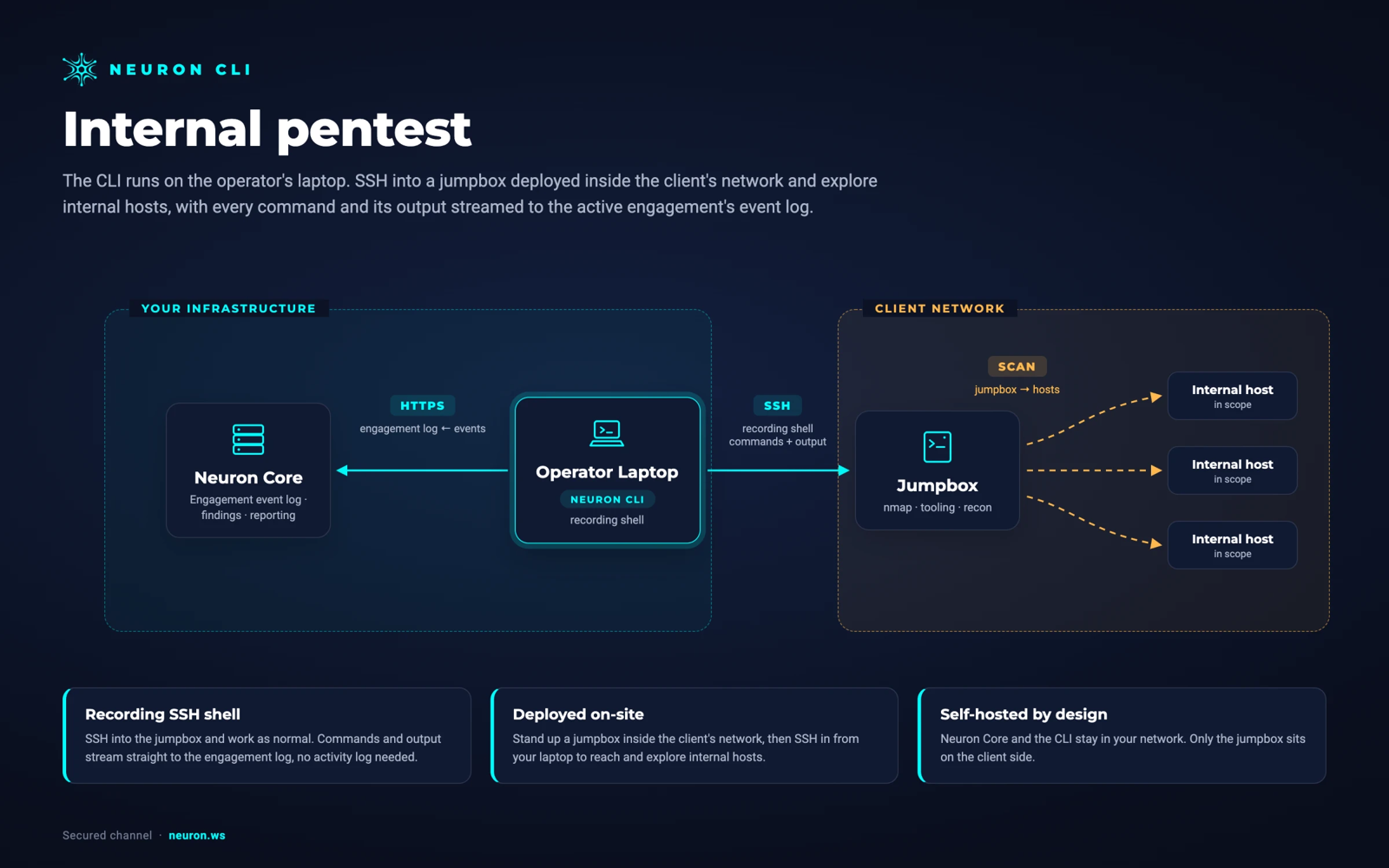
Run Nmap from a jumpbox inside the client's network over SSH. Nothing is installed on the jumpbox. Neuron and the CLI stay in your network, and the results never pass through a third-party cloud.
From Nmapto the Final Report
Nothing goes from Nmap into the report unreviewed. NSE issues wait in the Scan Issues queue, where a tester checks the SMB signing result against a host or marks it a false positive, then promotes it into a finding with every affected host already attached.
Library matches make the common network findings quick. When your Findings Library has an approved entry for SMB signing or weak TLS, Promote matched issues turns a whole group of confirmed issues into findings in one action.
Rescan for the retest and import again. The new import job records which hosts and ports were added and which fields changed, and Rollback Import undoes a scan that should never have landed.
Nmap Integration FAQ
The questions teams ask most about Nmap and Neuron.
How do I import Nmap results into a pentest report?
Run the scan through the Neuron CLI with neuron nmap, or import an existing Nmap XML file from the engagement's Import page or with neuron import. Hosts, ports, service versions, and OS matches land on the engagement, and NSE results become scan issues you can promote into findings.
Which Nmap output format does Neuron accept?
Nmap XML, written with -oX or as the .xml file from -oA. Normal and grepable output are not imported. Neuron detects Nmap XML from its content, so neuron import needs no --source flag, and the browser import also accepts pasted XML.
Which Nmap NSE scripts become scan issues?
smb2-security-mode and smb-security-mode for SMB signing, smb-protocols for SMBv1, ssl-enum-ciphers for deprecated protocols and weak ciphers, and ftp-anon for anonymous FTP. Any vuln script that reports VULNERABLE or LIKELY VULNERABLE is raised as well, with its CVEs, as an Nmap issue a tester still has to confirm.
Do I need to add -oX when running Nmap through neuron?
No. If you did not name an XML output, neuron adds -oX pointing at a temporary file and removes it after the import. If you did, with -oX or -oA, your Nmap file is kept where you asked and imported from there.
Can Neuron handle Nmap scans of a whole /16?
Yes. Nmap XML is stream-parsed and written in batches of hosts, so a large scan never has to fit in memory. The import runs as a background job you can leave and check later under Import Jobs.
Where does Nmap scan data go?
Onto your own self-hosted Neuron server, in the engagement it was imported to. The CLI sends Nmap results from your laptop over HTTPS, and no scan data passes through a third-party cloud.
More Neuron Integrations
Masscan Reporting and Masscan XML Import
Network DiscoveryPCAP Import: Hosts and Services From Captures
Network DiscoveryNetExec (nxc) Reporting and Logging
Active DirectoryCertipy AD CS Reporting and ESC Findings
Active DirectoryNuclei Scan Reporting and Import
Web Testingffuf Reporting and Content Discovery Logging
Web TestingMythic C2 Reporting and Activity Logging
C2 FrameworksSliver C2 Reporting and Activity Logging
C2 FrameworksReady to Transform Your Security Practice?
See how Neuron helps security teams replace fragmented tools with a single platform for offensive security, bringing structure, visibility, and consistency to every engagement.
Platform