NetExec Reporting,
Without Scraping the Terminal
Run NetExec through the Neuron CLI and every host, share, user, and credential it finds lands in your engagement. NetExec reporting without scraping terminal output.
Just Test. The Timeline Writes Itself.
NetExec sweeps a network in seconds and prints everything to the terminal. Turning that into report evidence means scrolling back, copying, and hoping the buffer did not roll over. Neuron keeps it, structured, before the buffer wins.
Put neuron in front of nxc and the results import the moment it finishes. Hosts, SMB signing status, shares and their access, users, valid credentials, and local admin access land in the engagement, and the command and its full output land on the timeline.
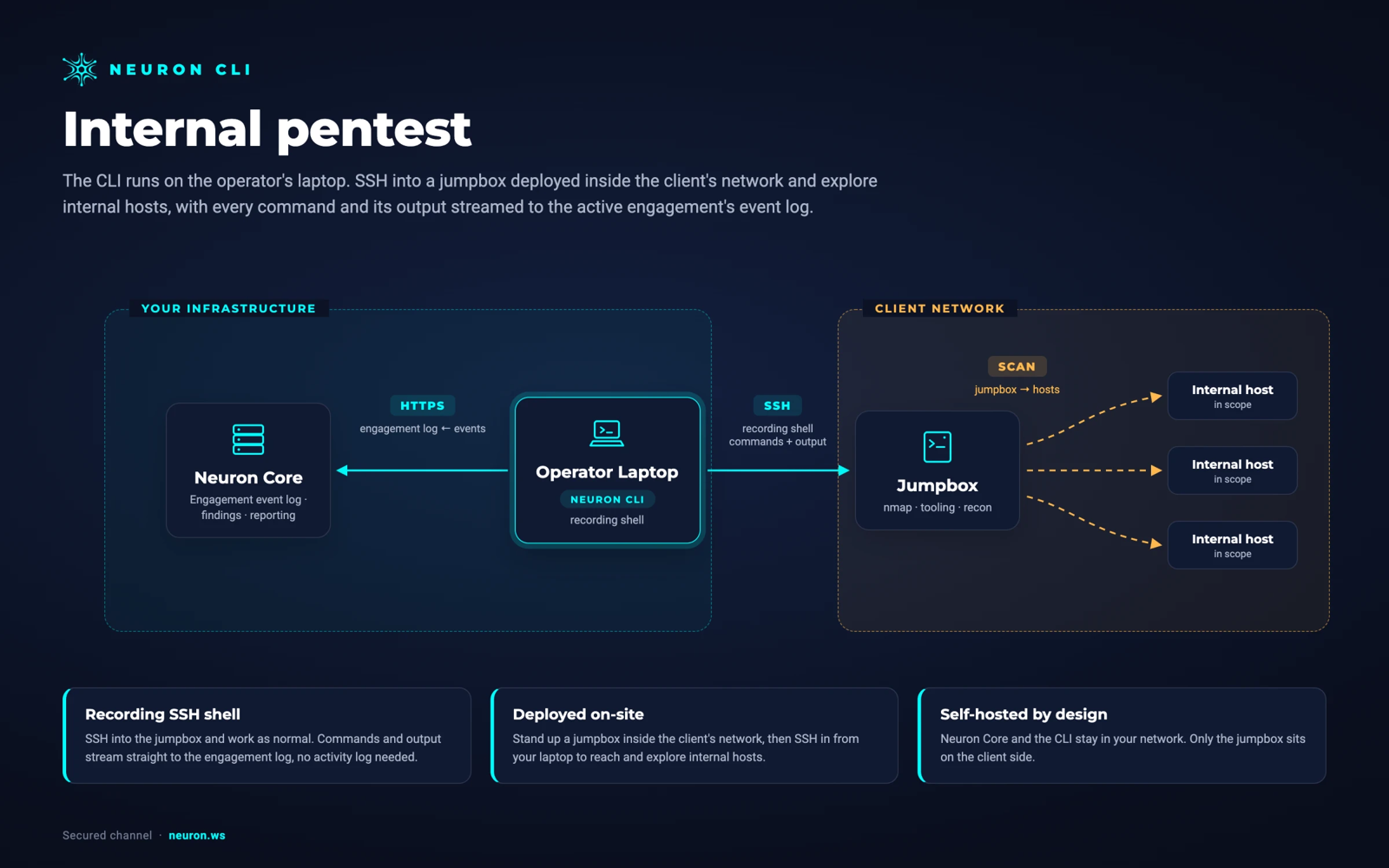
Add --ssh jumpbox to run it on the box inside the client network. Your SSH config, agent, and jump hosts apply.
$ neuron export hosts targets.txt✓ 41 in-scope hosts written $ neuron --ssh jumpbox nxc smb targets.txt \ -u svc_backup -p *** --shares SMB 10.20.0.14 DC01 [+] acme.local\svc_backup✓ 41 hosts, 23 shares, 1 credential imported- 14:06 Import NetExec: 3 hosts with admin access
- 14:02 Import NetExec: 41 hosts, 23 shares
- 14:02 Command nxc smb targets.txt --shares
- 13:58 Import Nmap: 41 hosts, 187 ports
Why NetExec Reporting Takes So Long
NetExec output is dense, colourful, and gone the moment the terminal scrolls. The nxcdb workspace keeps some of it, but only on the box you ran it from, and only in a format nobody wants to paste into a report.
So the findings that come out of an internal test, SMB signing disabled across the estate, a readable share full of scripts, a service account with local admin everywhere, get written up from screenshots of a terminal and a list of IPs typed by hand.
Multiply that by every tester on the engagement and every protocol they swept, and the report is built from fragments.
Everything NetExec Produces, On the Engagement
Put neuron in front of NetExec and the results import the moment it finishes.
Hosts
Every host NetExec reached, with hostname, domain, OS, and SMB signing status, created or updated in the engagement.
Shares and Access
Shares discovered with --shares, with read and write access per share, ready to back an excessive permissions finding.
Valid Credentials
Credentials that authenticated, recorded on the engagement, with the hosts where they grant local admin.
Users and Groups
Users and groups enumerated over SMB and LDAP, attached to the engagement for the next step.
Every Protocol
SMB, LDAP, WinRM, MSSQL, SSH, RDP, and the rest. Whatever protocol you sweep, the results land in the same place.
Password Policy
The domain password policy from --pass-pol, with minimum length and lockout threshold, ready for the weak policy finding and the spray you plan around it.
How to Log NetExec to Your Engagement
- 01
Export your targets
Write the engagement's in-scope hosts to a file, one per line. Hosts the client excluded never make the list, so a sweep never touches a box it should not.
$ neuron export hosts targets.txt - 02
Read the lockout policy first
Pull the password policy from a domain controller before you spray. It lands on the engagement, so everyone on the team plans around the same lockout threshold.
$ neuron --ssh jumpbox nxc smb 10.20.0.14 -u svc_backup -p *** --pass-pol - 03
Sweep through neuron
Put neuron in front of nxc. Everything after the tool name is passed through unchanged and the colour output streams to your terminal as usual.
$ neuron --ssh jumpbox nxc smb targets.txt -u svc_backup -p *** --shares - 04
Stay in the recording shell for the rest
For a long session of nxc, smbclient, and impacket, start the recording shell on the jumpbox and drop the prefix. NetExec results still import, and everything else is logged.
$ neuron --ssh jumpbox shell
Your Infrastructure. Your Data.
Run NetExec from a jumpbox inside the client's network over SSH. Nothing is installed on the jumpbox. Neuron and the CLI stay in your network, and the results never pass through a third-party cloud.
From NetExecto the Final Report
The internal test findings that NetExec surfaces, SMB signing not required, readable and writable shares, credential reuse, excessive local admin, each start with the affected hosts already attached. Promote the result into a finding and the host list is exact.
Because results land next to your Nmap imports and the rest of the timeline, the report can show how one credential led to the next host, in order, with the command that proved each step.
After remediation, run the same sweep again. The comparison is direct: which hosts still accept SMB without signing, which shares Domain Users can still read, and where the old service account still works.
NetExec Integration FAQ
The questions teams ask most about NetExec and Neuron.
How do I get NetExec results into a pentest report?
Run nxc through the Neuron CLI by putting neuron in front of it. When it finishes, hosts, shares, users, valid credentials, and admin access import into the engagement, and the full command and output land on the timeline, ready to promote into findings.
Do I have to change how I run NetExec?
No. Everything after nxc is passed through unchanged and the output streams to your terminal as usual. Or start the recording shell and run nxc with no prefix at all.
Can I run NetExec on a jumpbox inside the client network?
Yes. Add --ssh and the host. The CLI uses your own ssh, so your config, agent, and jump hosts apply, and the results import as if nxc had run locally. Nothing is installed on the jumpbox.
Does it still work with CrackMapExec?
NetExec is the maintained successor to CrackMapExec and uses the same command structure. Run nxc through neuron and the results import.
Which NetExec protocols does Neuron import?
All of them: SMB, LDAP, WinRM, MSSQL, SSH, RDP, WMI, FTP, VNC, and NFS. Hosts, shares, users, and working credentials from any protocol land on the same engagement, so an LDAP enumeration and an SMB sweep build one picture.
More Neuron Integrations
Certipy AD CS Reporting and ESC Findings
Active DirectoryBloodHound Reporting and Attack Path Import
Active DirectoryNmap Reporting: Nmap XML to Pentest Report
Network DiscoveryMasscan Reporting and Masscan XML Import
Network DiscoveryNuclei Scan Reporting and Import
Web Testingffuf Reporting and Content Discovery Logging
Web TestingMythic C2 Reporting and Activity Logging
C2 FrameworksSliver C2 Reporting and Activity Logging
C2 FrameworksReady to Transform Your Security Practice?
See how Neuron helps security teams replace fragmented tools with a single platform for offensive security, bringing structure, visibility, and consistency to every engagement.
Platform