Masscan Reporting,
Every Open Port Accounted For
Run Masscan through the Neuron CLI or import its XML, and every open port it finds lands on the engagement, ready for follow-up. Masscan output to report, no parsing.
Just Test. The Timeline Writes Itself.
Masscan sweeps every port on a /16 in the time a detailed scan spends on a handful of hosts. What it leaves behind is a long list of addresses and ports, and someone has to turn that list into an inventory before the real testing starts. Neuron does that the moment the sweep ends.
Put neuron in front of masscan and the CLI adds -oX, runs the sweep, and imports every host and open port. Service names from --banners merge in as they arrive, IPv6 targets import alongside IPv4, and the command lands on the timeline.
Already have the XML? neuron import recognises Masscan output from its content and keeps it apart from Nmap, or you can upload or paste it in the browser.
$ neuron export subnets ranges.txt✓ 6 in-scope subnets written $ neuron --ssh jumpbox masscan -iL ranges.txt \ -p1-65535 --rate 20000 Discovered open port 3389/tcp on 10.20.14.7✓ 1,903 hosts, 4,712 ports imported- 09:58 Command nmap -sV -iL live.txt
- 09:51 Import Masscan: 1,903 hosts, 4,712 ports
- 09:12 Command masscan -iL ranges.txt -p1-65535
- 09:10 Command neuron export subnets ranges.txt
Why Masscan Reporting Takes So Long
Masscan output is wide and shallow. One record per open port, often thousands of them for a single range, and with --banners the same port appears twice: once when it answers, and again when the banner arrives.
Teams paper over that with -oL and a grep pipeline, then feed the result to the next tool by hand. The record of what was open on day one, before anyone touched anything, never makes it into the engagement.
And on a large range, nobody can say afterwards which sweep found which host, or whether it was run against the right ranges at all.
Everything Masscan Produces, On the Engagement
Put neuron in front of Masscan and the results import the moment it finishes.
Hosts by IP
Every responding address, IPv4 and IPv6 alike, created or matched by IP and placed into the engagement subnet it falls in.
Open Ports
Port, protocol, and state for every open port. Closed results and hosts with no ports are skipped by default.
Banner Service Names
Service names from --banners merge into the port record, even though Masscan writes them as a separate entry from the open port.
Service Checklists
Ports that arrive with a service name pick up the matching todos from your Service Checklists, so follow-up work is queued as the sweep imports.
Internal Exposure
Telnet, FTP, Redis, MongoDB, VNC, an unauthenticated Docker API, and the other services that have no business on an internal network are flagged in Scan Issues.
Tags and Assessments
Tag a sweep with --tag, or assign its hosts to an assessment from the browser import. Tags merge with any a host already had.
How to Log Masscan to Your Engagement
- 01
Agree the rate before you sweep
Set --rate to what the rules of engagement allow. The full command, rate included, is logged on the timeline, so when the client's network team asks how hard you pushed, the answer is on record.
- 02
Write out the ranges in scope
Export the engagement's subnets, one per line, ready for masscan -iL. Out-of-scope ranges stay out of the file.
$ neuron export subnets ranges.txt - 03
Run masscan through neuron
Arguments pass straight through. The CLI adds -oX unless you chose an output yourself, and it never overrides -oL, -oJ, or -oG: those runs are logged but not imported.
$ neuron --ssh jumpbox masscan -iL ranges.txt -p1-65535 --rate 20000 - 04
Follow up on the live hosts
Export the hosts now on the engagement and hand them to Nmap for versions and scripts. The results merge into the same host records Masscan created.
$ neuron export hosts live.txt
Your Infrastructure. Your Data.
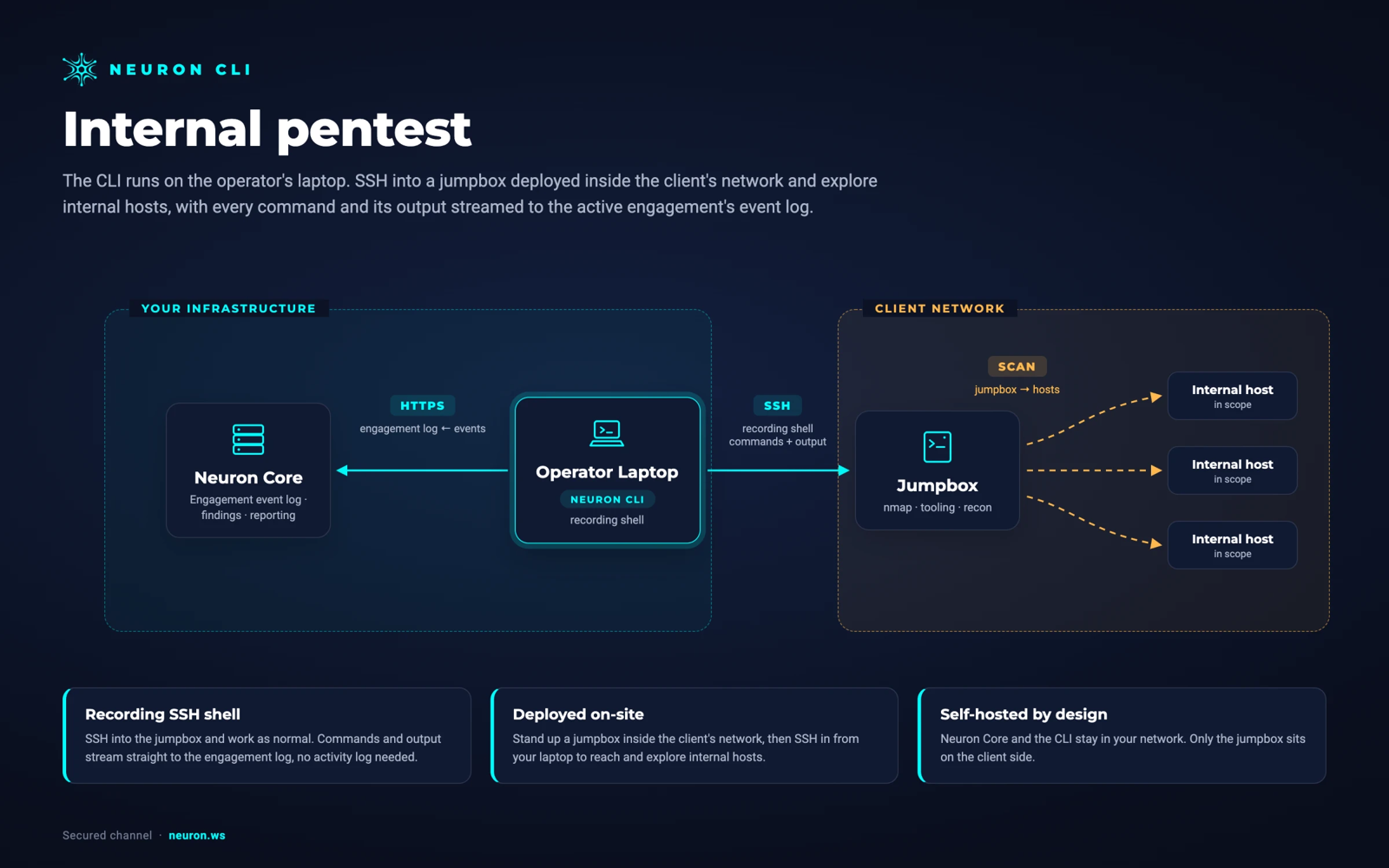
Run Masscan from a jumpbox inside the client's network over SSH. Nothing is installed on the jumpbox. Neuron and the CLI stay in your network, and the results never pass through a third-party cloud.
From Masscanto the Final Report
A Masscan sweep rarely produces findings on its own. What it produces is the evidence of exposure: every port that answered on the day of the test, attributed and timestamped, which is exactly what a segmentation test or an external attack surface section needs.
Exposure analysis turns that inventory into candidates. A cleartext or unauthenticated service answering where it should not lands in Scan Issues, where a tester confirms it and promotes it into a finding that lists every affected host.
When Nmap or NetExec follows up on the same hosts, their results merge into the records the sweep created, so the finding links the sweep, the service detail, and the proof without anyone matching IP addresses by hand.
Masscan Integration FAQ
The questions teams ask most about Masscan and Neuron.
How do I get Masscan output into a pentest report?
Run masscan through the Neuron CLI with neuron masscan, or import Masscan XML with neuron import or the engagement's Import page. Hosts and open ports land on the engagement, exposure analysis flags the risky ones, and a tester promotes the real issues into findings.
Which Masscan output format does Neuron import?
Masscan XML, written with -oX. Masscan uses the Nmap XML schema with scanner="masscan" on the root element, and Neuron reads that marker to send the file to the Masscan importer rather than the Nmap one. List, JSON, grepable, and binary output are not imported.
What happens if I run masscan with -oL through neuron?
The sweep runs exactly as you asked and is logged to the timeline, but nothing is imported. Neuron never overrides an output format you chose, so use -oX with masscan, or leave the output flags off and the CLI adds -oX for you.
Does the import keep Masscan banner results?
Yes. With --banners, Masscan writes the banner as a separate record from the open port. Neuron merges the two, so the port keeps its state and gains the service name.
Can I pipe Masscan output straight into Neuron?
Yes. Write XML to stdout with masscan -oX - and pipe it to neuron import -. The format is detected from the content, so no --source flag is needed.
Does Masscan data leave our network?
No. Neuron is self-hosted, and the CLI sends Masscan results from your laptop to your own server over HTTPS. The sweep, the XML, and the host inventory stay inside your infrastructure.
More Neuron Integrations
Nmap Reporting: Nmap XML to Pentest Report
Network DiscoveryPCAP Import: Hosts and Services From Captures
Network DiscoveryNetExec (nxc) Reporting and Logging
Active DirectoryCertipy AD CS Reporting and ESC Findings
Active DirectoryNuclei Scan Reporting and Import
Web Testingffuf Reporting and Content Discovery Logging
Web TestingMythic C2 Reporting and Activity Logging
C2 FrameworksSliver C2 Reporting and Activity Logging
C2 FrameworksReady to Transform Your Security Practice?
See how Neuron helps security teams replace fragmented tools with a single platform for offensive security, bringing structure, visibility, and consistency to every engagement.
Platform