Evilginx Reporting,
Before the Redirector Is Gone
Stream Evilginx lure visits, captured credentials, and captured session tokens into your engagement timeline. Adversary-in-the-middle phishing reporting with the evidence already collected.
Just Test. The Timeline Writes Itself.
Evilginx captures credentials and session tokens on a redirector you will tear down when the engagement ends. If the evidence is not copied off first, it goes with it. The Neuron CLI Evilginx collector copies it off as it happens.
The collector streams the redirector into Neuron for as long as it runs. Lure visits, captured credentials, and captured sessions land on the engagement timeline the moment they happen, attributed and timestamped.
Your phishlets live in the engagement File Share. neuron copy puts them on the redirector, and neuron sync pushes your edits back down.
$ neuron --ssh redirector copy \ neuron:phishlets/o365.yaml ~/phishlets/✓ Copied o365.yaml $ neuron collector evilginx --ssh redirector \ --evilginx-db ~/.evilginx/data.db✓ Streaming Evilginx to Acme Social Engineering- 11:18 Evilginx Session captured: r.patel (o365)
- 11:17 Evilginx Credentials captured: r.patel
- 11:16 Evilginx Lure visit from 203.0.113.42
- 10:55 GoPhish Campaign launched: SharePoint Q4
Why Evilginx Reporting Takes So Long
An adversary-in-the-middle campaign proves something a click rate cannot: that MFA did not stop the attacker. The evidence for that is a captured session token on a VPS that exists for two weeks.
Getting it into the report usually means SSHing into the redirector, reading the Evilginx sessions table, and copying each capture out by hand before the box is destroyed. Miss one and the strongest finding in the engagement has no evidence behind it.
Phishlets have the same problem. Each tester edits their own copy on their own redirector, and the version that actually worked is not the one in the repo.
Everything Evilginx Produces, On the Engagement
The Evilginx collector streams the moment each event happens, for as long as it runs.
Lure Visits
Every lure visit, with source address and user agent, so the timeline shows who reached the phishing page and when.
Captured Credentials
Usernames and passwords captured through the proxy, recorded on the engagement and ready for the finding.
Captured Sessions
Session tokens captured after MFA, kept with the engagement as evidence that MFA was bypassed.
Phishlet in Use
The phishlet behind each capture, so the report shows exactly which service was proxied.
Phishlets in the File Share
Keep phishlets in the engagement File Share and push them to the redirector with neuron copy and neuron sync.
What the Session Opened
Replay the stolen cookie and every mailbox search or SharePoint download you run lands right after the capture, so the impact is evidenced, not described.
How to Log Evilginx to Your Engagement
- 01
Deploy your phishlets
Keep phishlets in the engagement File Share and copy them to the redirector. After you edit one in Neuron, neuron sync puts it back in the same place.
$ neuron --ssh redirector copy neuron:phishlets/o365.yaml ~/phishlets/ - 02
Start the collector
Point it at the Evilginx database on the redirector with --ssh. The collector reads captures over your own SSH, so nothing extra is exposed on the redirector.
$ neuron collector evilginx --ssh redirector --evilginx-db ~/.evilginx/data.db - 03
Create the lures
In the Evilginx console, create a lure for the phishlet and grab its URL for the email. Visits start landing on the timeline the moment the first target opens it.
$ lures create o365 - 04
Tear down without losing anything
When the campaign closes, stop the collector and destroy the redirector. Every capture is already on the engagement, so there is nothing to scp off first.
$ neuron collector stop evilginx
Your Infrastructure. Your Data.
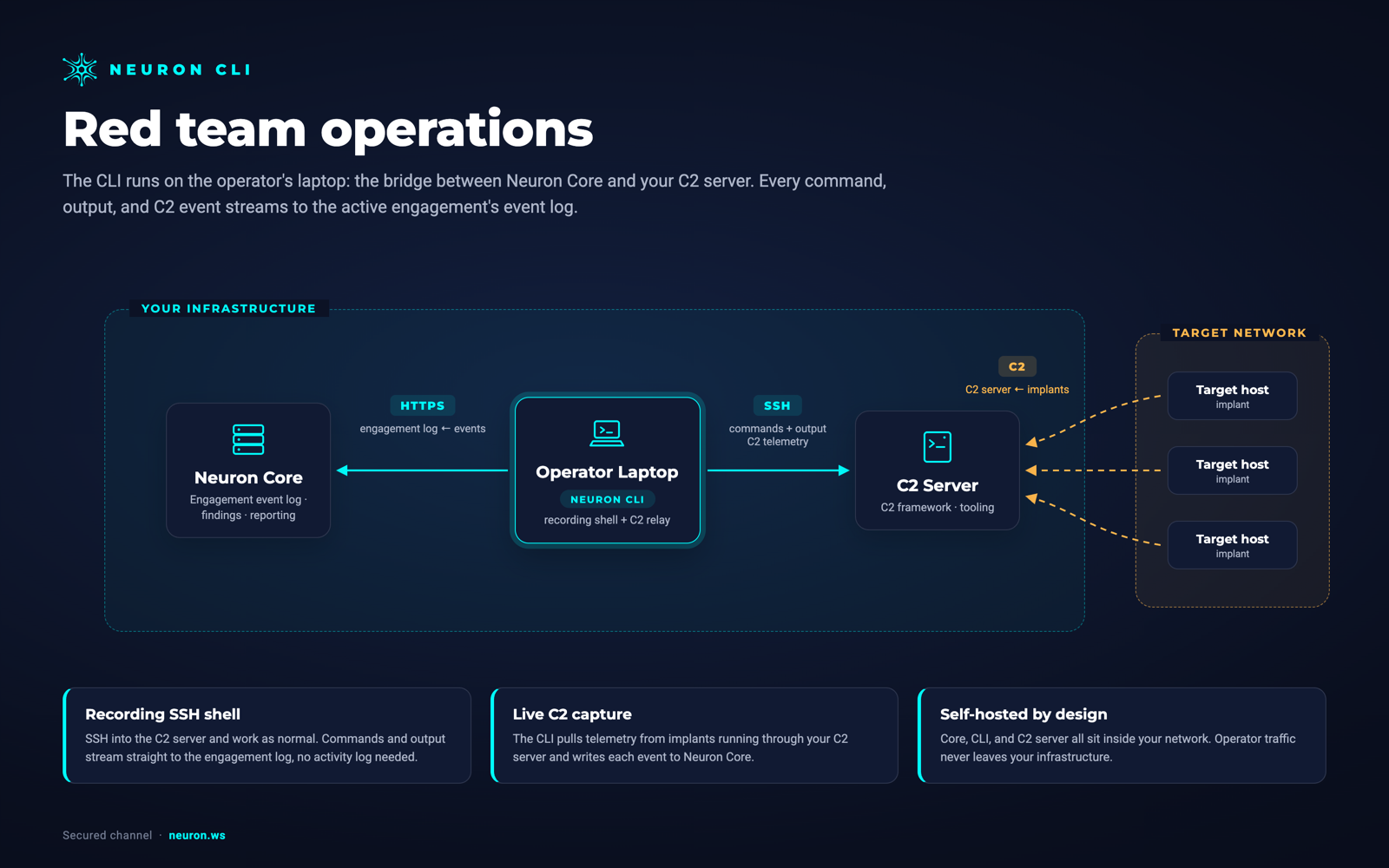
The CLI runs on the operator's laptop, the bridge between Neuron and your phishing infrastructure. Neuron, the CLI, and Evilginx all sit inside your network. Nothing is routed through a third-party cloud.
Evilginx needs the Red Team module on your Neuron server.
From Evilginxto the Final Report
The MFA bypass finding writes itself: the lure visit, the captured credentials, and the captured session sit together on the timeline, timestamped and attributed, with the phishlet that made it work.
Because captures sit next to the logins and commands that followed, the report shows what the stolen session was used for, not just that it was stolen.
Tear down the redirector whenever you like. The evidence is already in your own Neuron server.
Evilginx Integration FAQ
The questions teams ask most about Evilginx and Neuron.
How do I report on Evilginx captured sessions?
Run the Neuron CLI Evilginx collector while the campaign is live. It streams lure visits, captured credentials, and captured session tokens into the engagement timeline, so the evidence for an MFA bypass finding is saved before the redirector is torn down.
Does the collector need anything installed on the redirector?
No. The collector runs on your laptop and reads the Evilginx database over your own SSH with --ssh. Nothing new listens on the redirector.
Where are captured Evilginx session tokens stored?
On the engagement in your own self-hosted Neuron server, with access limited to the people on that engagement. A live session cookie for a client's Microsoft 365 tenant is exactly the kind of evidence that should never sit in a third-party cloud.
Can the team share phishlets?
Yes. Keep them in the engagement File Share and copy them to each redirector with neuron copy. When someone edits a phishlet in Neuron, neuron sync puts the new version in the same place on the box.
Can I collect from several Evilginx redirectors at once?
Yes. Run one collector per redirector and give each a --name, such as o365-redirector and okta-redirector. neuron collector list shows them side by side, and every capture records which one it came from.
More Neuron Integrations
GoPhish Reporting and Campaign Tracking
PhishingMythic C2 Reporting and Activity Logging
C2 FrameworksSliver C2 Reporting and Activity Logging
C2 FrameworksMetasploit Reporting and Session Logging
C2 FrameworksNetExec (nxc) Reporting and Logging
Active DirectoryCertipy AD CS Reporting and ESC Findings
Active DirectoryBloodHound Reporting and Attack Path Import
Active DirectoryNmap Reporting: Nmap XML to Pentest Report
Network DiscoveryReady to Transform Your Security Practice?
See how Neuron helps security teams replace fragmented tools with a single platform for offensive security, bringing structure, visibility, and consistency to every engagement.
Platform