GoPhish Reporting,
Not CSV Exports
Stream GoPhish campaign events into your engagement: emails sent, opened, clicked, reported, and credentials submitted. Phishing campaign reporting without the CSV exports.
Just Test. The Timeline Writes Itself.
A phishing campaign produces a stream of opens, clicks, and submissions. Reporting on it usually means exporting results from GoPhish and stitching them into the rest of the engagement by hand. The Neuron CLI GoPhish collector does the stitching as it happens.
The collector streams campaign events into Neuron for as long as it runs. Every email sent, opened, clicked, and reported, and every set of credentials submitted, lands on the engagement timeline next to the rest of the operation.
Results match the people already in the engagement, so the report shows who was targeted, who clicked, who reported it, and what the access led to.
$ neuron collector gophish --ssh phish \ --gophish-url https://127.0.0.1:3333 Tunnelling to phish over SSH✓ Streaming GoPhish to Acme Social Engineering $ neuron collector list gophish running Acme Social Engineering- 09:47 GoPhish Credentials submitted: j.ortiz
- 09:46 GoPhish Clicked link: j.ortiz
- 09:31 GoPhish Email reported: m.chen
- 09:00 GoPhish Campaign launched: Benefits Q4
Why GoPhish Reporting Takes So Long
GoPhish tracks a campaign well. Reporting on it means exporting the results CSV, cleaning it up, and building the click-rate charts again in a spreadsheet, for every campaign, every time.
The harder part is the story. A social engineering engagement is rarely just a click rate. The credentials submitted on Tuesday became the VPN login on Wednesday and the domain foothold on Thursday, and GoPhish only knows about the first step.
When those steps live in separate tools, the narrative that makes the report worth reading gets rebuilt by hand at the end.
Everything GoPhish Produces, On the Engagement
The GoPhish collector streams the moment each event happens, for as long as it runs.
Sent, Opened, Clicked
Every email sent, opened, and clicked, per recipient, with the time it happened and the campaign it belongs to.
Submitted Credentials
Credentials submitted to the landing page, recorded on the engagement and ready to show where they led.
Reported Emails
Recipients who reported the phish, so the report credits the people who did the right thing, not only the ones who clicked.
Campaign Events
Campaign launch and completion, so the timeline shows exactly when each wave went out.
Matched to People
Recipients match the people already in the engagement, so results attach to the right person instead of a bare email address.
Click to Compromise
The submission at 09:47 and the VPN login at 10:12 sit a few rows apart, so the report shows what one click actually cost.
How to Log GoPhish to Your Engagement
- 01
Export your targets
Write the engagement's people out as email addresses, ready to load into a GoPhish group. Anyone marked out of scope stays off the list, so a contractor the client excluded never gets a lure.
$ neuron export people targets.txt - 02
Copy the GoPhish API key
Open Settings in the GoPhish admin UI and copy the API key. Keep it in an environment variable so it never lands in your shell history.
$ export GOPHISH_API_KEY=<key> - 03
Start the collector
Point it at the GoPhish admin API with your API key in --gophish-key or the GOPHISH_API_KEY environment variable. Add --ssh when the admin port only listens on the phishing server.
$ neuron collector gophish --ssh phish --gophish-url https://127.0.0.1:3333 - 04
Launch the campaign
Run the campaign in GoPhish as usual. Every event lands on the timeline as it happens, and neuron collector stop ends the collector when the campaign closes.
$ neuron collector stop gophish
Your Infrastructure. Your Data.
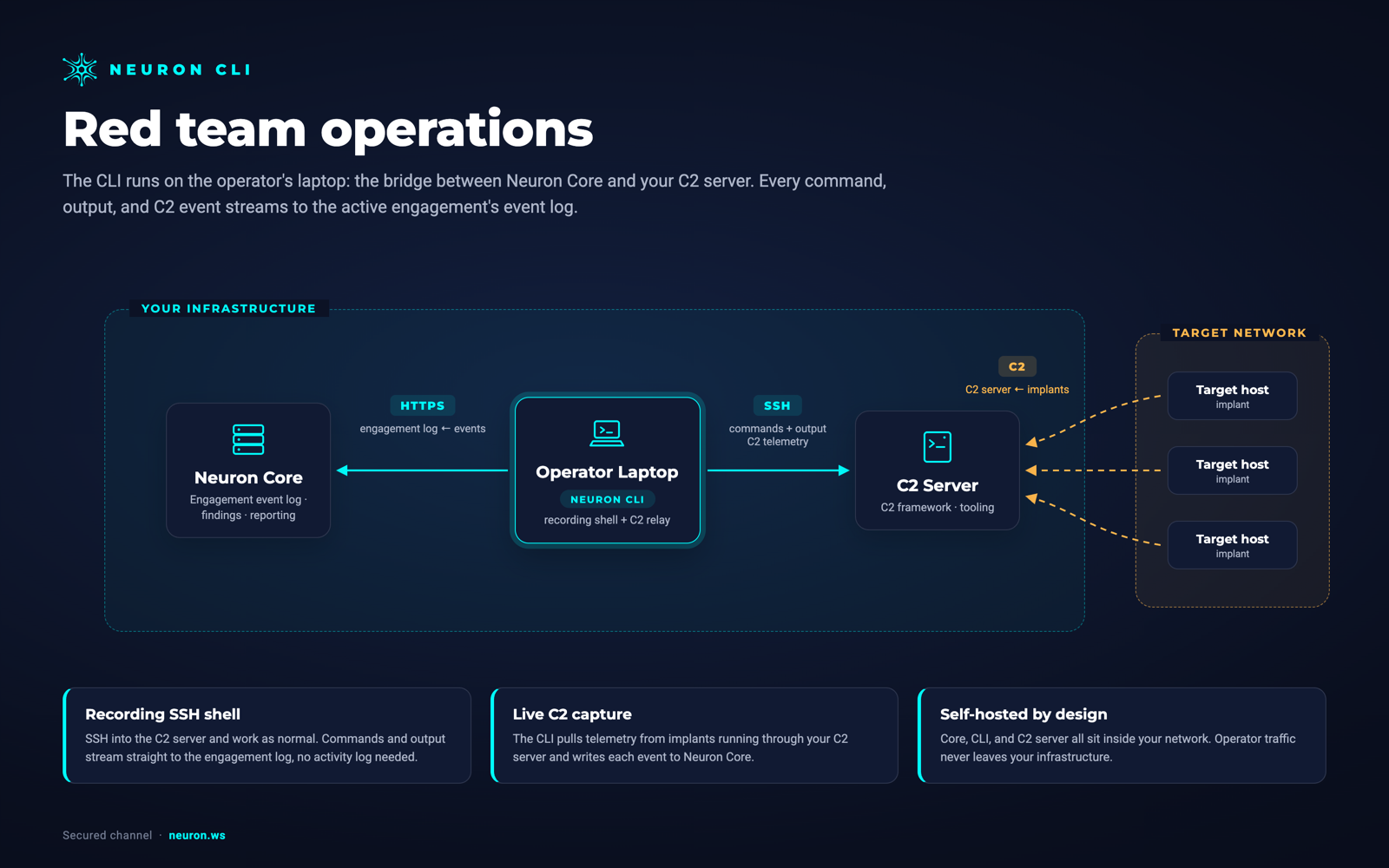
The CLI runs on the operator's laptop, the bridge between Neuron and your phishing infrastructure. Neuron, the CLI, and GoPhish all sit inside your network. Nothing is routed through a third-party cloud.
GoPhish needs the Red Team module on your Neuron server.
From GoPhishto the Final Report
Campaign results are already attached to the people in the engagement, so the phishing section of the report starts with who was targeted, who clicked, who submitted credentials, and who reported it.
Because the submissions sit on the same timeline as the access that followed, the report can tell the full attack chain: the phish, the login, the foothold, and the impact, in order and with evidence.
Run the same pretext again next quarter and the comparison is already there: last campaign's clickers, this campaign's reporters, and whether awareness training moved either number.
GoPhish Integration FAQ
The questions teams ask most about GoPhish and Neuron.
How do I report on a GoPhish campaign?
Run the Neuron CLI GoPhish collector while the campaign is live. It streams sent, opened, clicked, reported, and submitted events into the engagement, matched to the people you targeted, so the results are ready for the report without exporting a CSV.
How does the GoPhish collector authenticate?
With your GoPhish API key, passed as --gophish-key or the GOPHISH_API_KEY environment variable. Add --ssh to reach an admin port that only listens on the phishing server.
Where do passwords submitted to a GoPhish landing page go?
Onto the engagement in your own self-hosted Neuron server, next to the person who submitted them, with access controlled per engagement. They are never sent to a third-party cloud, which matters when the passwords are real.
Can I see what happened after someone clicked?
Yes. GoPhish events sit on the same timeline as your C2 callbacks and shell commands, so the step from submitted credentials to initial access is visible in order.
Can one collector follow several GoPhish campaigns?
Yes. The collector streams every campaign the API key can see, and each event carries its campaign name, so a multi-wave engagement with different pretexts still reads clearly on one timeline.
More Neuron Integrations
Evilginx Reporting and Session Capture Logging
PhishingMythic C2 Reporting and Activity Logging
C2 FrameworksSliver C2 Reporting and Activity Logging
C2 FrameworksMetasploit Reporting and Session Logging
C2 FrameworksNetExec (nxc) Reporting and Logging
Active DirectoryCertipy AD CS Reporting and ESC Findings
Active DirectoryBloodHound Reporting and Attack Path Import
Active DirectoryNmap Reporting: Nmap XML to Pentest Report
Network DiscoveryReady to Transform Your Security Practice?
See how Neuron helps security teams replace fragmented tools with a single platform for offensive security, bringing structure, visibility, and consistency to every engagement.
Platform